Friday, 10 February 2012

Configuring Transaction in Composite

est Case: There are two table , one is Master and other is Child has primary/foreign key relationship. By a BPEL process we’ll insert the data into Master table and with other BPEL we’ll insert the data into Child in a same composite. But if any error occur while inserting the data into Child it will rollback all transactions in Master table as well.
Solution:Here I’ll use Dept and Emp table as Master and Child table.1st I’ll insert data into Dept and within same global transaction will insert data into Emp. After inserting the data into Emp I’ll throw rollback fault from BPEL and it will automatically rollback the insertion of Dept table data.Here is my composite,
image
The insertDeptBPEL is synchronous one,
image
The insertChildBPEL is synchronous one also,
image
Here in the throw activity,
image
Now the designing is complete, we need to define the transactional properties now in composite.xml like below,
<component name="insertDeptBPEL" version="1.1">
    <implementation.bpel src="insertDeptBPEL.bpel"/>
    <property name="bpel.config.transaction" many="false" type="xs:string">requiresNew</property>
    <property name="onewayDeliveryPolicy">sync</property>
  </component>
  <component name="insertChildBPEL" version="1.1">
    <implementation.bpel src="insertChildBPEL.bpel"/>
    <property name="bpel.config.transaction" many="false" type="xs:string">required</property>  </component>
Then deploy the run the composite , data will not be inserted in either of the table as it will execute rollback from the code.

Performance tuning in soa 11g. with idempotent and non idempotent and xa transaction


There are many process level and domain level properties that we need to understand in order to fine tune the performance of our process.


For any BPEL process we have a file called bpel.xml we can set these properties over here and redeploy the project in order to make the changes take effect.

The different performance properties used are

1>Idempotent
=================

It can be set within the bpel.xml file.

General sysntax is

<partnerLinkBindings>
<property name="idempotent">true</property>
</partnerLinkBinding>

An idempotent activity is an activity that can be retried eg- the assign activity. A non-idempotent activity is an activity that can happen only once.The default value of idempotent property is true.By default, in a bpel process invoke activity is an idempotent activity, It means that the BPEL engine will not dehydrate the instance right after invoke activities. This property can be set for each partner link.If it is set to true and when you invoked a bpel process and your environment get crashed all of a sudden then when you will restart the system the invoke will be executed again.But when we will set this property to false the bpel engine will dehydrate the activity after the invoke and when you will start the server it will start from the last saved activity and not from the invoke activity.Thus it will enhance performance.

2>nonBlockingInvoke
=====================

This property is used when you have more than one invoke activity in parallel like in a typical flow activity.The bpel engine by default creats a single thread and even though your invoke activities are in parallel the engine calls them sequentially essentially from left to right.We can change this behaviour by including a property called nonBlockingInvoke in order to create separate threads for each invoke activity causing the performace to increase.The default value for nonBlockingInvoke is false which mean the engine will call the invoke activity in a single process Thread.We will change it to true in order to create new threads for execution thus processing in parallel will increase the performance.

General syntax

<partnerLinkBindings>

<property name="nonBlockingInvoke">true</property>

</partnerLinkBindings>


3>inMemoryOptimization
=========================

This properties is applied only in transient process.Transient process are those process which doesnot contain any mid point activities like receive,pick or wait activities or even any idempotent activities or in other words we can say it never stops and wait for any activities in between or wait for any results in between.This property tells the engine that the process is transient process and dehydration of the instance is not required.The default value of this property is false.When it is set to true the engine will keep the instances of this process only in memory during the course of execution.

This property works in conjunction with completionPersistPolicy and completionPersistLevel.

These properties values are determined to determine the behaviour of persistence

General syntax is


<BPELProcess src="getValue.bpel" id="getValue">
.................................
<configurations>
<property name="inMemoryOptimization">true</property>
</configurations>
</BPELProcess>


4>completionPersistPolicy 
============================

The completionPersistPolicy property can only be used when inMemoryOptimization is set to be true in a transient process.This property controls when to persist instances.

The default value for this property is on ,which means that the instance will be saved normally.The other values that can be used for this property are

a>off-no instance for the process will be saved.
b>faulted-Only faulted instances will be saved for the process.
c>deferred-It is more or like on status but here some of the instances may not get stored in case of a crash of server.

General syntax is


<BPELProcess src="getValue.bpel" id="getValue">
.................................
<configurations>
<property name="inMemoryOptimization">true</property>
<property name="completionPersistPolicy">off</property>
</configurations>

</BPELProcess>


You can change it accordingly as per your requirement.

5>completionPersistLevel
===========================

The completionPersistLevel property can only be used when inMemoryOptimization is set to be true in a transient processes.The default value for this property is all which mean it will store all the state of the instances.It can also have an value of
instanceHeader which means only the meta data will be stored for the instance.by saying meta data i meana completion state, start/end dates, etc.

General syntax is


<BPELProcess src="getValue.bpel" id="getValue">
...
<configurations>
<property name="inMemoryOptimization">true</property>
<property name="completionPersistPolicy">faulted</property>
<property name="completionPersistLevel">All</property>
</configurations>
</BPELProcess>


here in my case i have set it to all that is i want to store all the states of the instance for the faulted instance.

6>deliveryPersistPolicy
============================

The deliveryPersistPolicy configuration property is used to turn on and off the DB persist of asynchronous process.The default value is on which means it store asynchronous process in delivery service DB.


To change it log in to the BPel console

http://host:port/BPELConsole

switch to configuration tab.There you will find this property

Changes whether the delivery messages are persisted. Delivery messages include invoke message, callback message and subscription message.

* on - delivery messages are persisted
* off - delivery messages are kept only in memory.

The default value is "on".

Asynchronous requests by default are saved in the delivery queue database table. These requests are later picked up by the worker threads and delivered to the targeted BPEL instances. The messages can be kept in delivery queue in memory cache in case of enhanced performance. 

If you are on version lower than 10.1.3.4 then you also need to take care of dspMaxThreads and ReceiverThreads

As per best practices it is recommended to have sum of dspMaxThreads across all the domain less than or equal to the receiverThreads.

Thursday, 9 February 2012

How to Undeploy Composite Manually

Sometime I noticed that you can’t undeploy the composite from SOA EM console.It is little bit irritating and can be of various reason like not deployed properly , database reference is null etc.
But I figured out undeployment procedure of SOA composite manually apart from wizard based.It worked fine for me.Here are the steps,
Login to EM console and go to mds configuration,
image
Export metadata,
image
soa-infra_metadata.zip file will be downloaded.Unzip the same and you will find deployed-composites folder and underneath deployed-composites.xml like below,
image
Delete the entry of whatever the composite you want to undeploy.You can delete the respective composite from your partition folder. Then zip it again and import the MDS from EM.
You need to restart the server and after that your composite will be gone !!!

Sensors in SOA 11g

Hi All... in this topic we will see how can we define sensors and in how many ways we can use these sensors for different purposes.
We can create three types of sensors in BPEL.

1) Variable sensors ----Variable sensors are used to monitor variables(or parts of a variable) of a BPELprocess.

2) Fault sensors ---- Fault sensors are used to monitor BPEL faults.

3) Activity sensors ----Activity sensors are used to monitor the execution of activities within a BPEL process.

Once we create a sensor we can associate an action to it. When a sensor is triggered by Oracle BPEL Process Manager, a new sensor value for that sensor is created. After that, all the sensor actions associated with that sensor are performed. A sensor action typically persists the sensor value in a database or sends the normalized sensor value data to a JMS queue or topic. For integration with Oracle Business Activity Monitoring, the sensor value can sent to the BAM adapter.

When we create a sensor we will get below files
bpel_process_name_sensor.xml --- defines the sensor definitions of a BPEL process.


bpel_process_name_sensorAction.xml --- defines the sensor action definitions of a BPEL process.

Using sensors in BPEL:

Create a soa project with BPEL as component (can be any template empty, sync or async)
We will create variable, activity, fault sensors in order respectively.
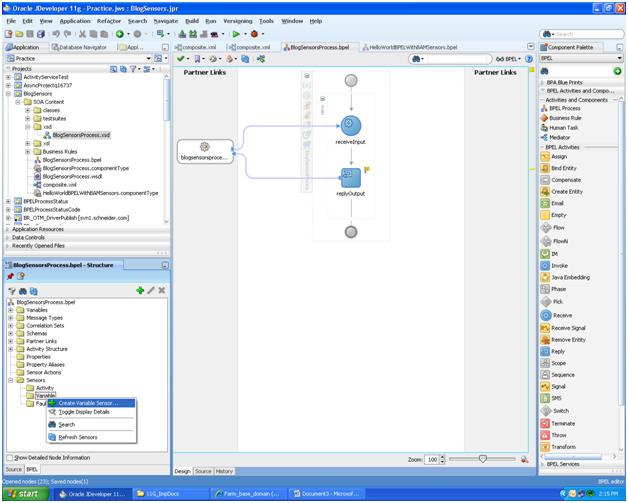
Now open the bpel process and go to structure window, right click variablesensor and select create variable sensor as below.


Give a proper name to sensor and select the variable to which you want to create a sensor and finish the creation.
 

Now right click activity sensor and select create activity sensor as below.


Give a proper name to sensor and select the activity to which you want to create a sensor and finish the creation.


To create fault sensor right click fault and select create. Now provide the name and select the fault for which we want to create. (In this example we are going with selection failure) as below.


Now we are done with creation of sensors and we are about to create sensor actions.
For this right click sensor actins and select create and then sensor action.


Here give some name and select the publish type as Database.(we have other options, in this sample we are going with database. Infact in BPEL console we will see the sensors with action -publish type as database.)

Database: Publishes the sensor data to the reports schema in the database. The sensor data can then be queried using SQL.
JMS Queue: Publishes the sensor data to a JMS queue.
JMS Topic: Publishes sensor data to JMS topic.
Custom: Publishes the data to custom Java class.
JMS Adapter: Publishes to remote queues or topics. (Above JMS Queue and JMS Topic publish types only publishes to local JMS destinations)


Now in edit all the sensors we have cretaed above and select the sensor action thatwe created now as below.


To get the selection failure for fault sensor we are creating an assign activity as below.


Now deploy the composite application and initiate it from em page.


It will get faulted because of our assign activity.


Now open the instance and go to sensor values tab.


In sensor values page we can see the sensors for variable, activity and fault sensors with the values like in below pics.


Till now we have seen sensors in BPEL.

Along with the BPEL sensors we have one more sensors called COMPOSITE sensors which we create in composite.xml. We will see these sensors in coming post in detail.

Wednesday, 8 February 2012

How to Remove Contents from MDS Repository

In 11g we can publish artifacts and commonly used schema, wsdl's in a meta data store to acccess across processes.

Often we realize that sometime we need to clean up and remove unnecessary and unwanted files from the repostiory.

There are two ways you can remove contents from MDS offline mode and online mode. I will explain both the options below


Option 1: Offline Mode


Step 1: Execute wlst.sh
Goto YOUR_MIDDLEWARE_HOME/Oracle_SOA1/common/bin and execute wlst.sh
Step 2: Run Command
At wlst command prompt (wls:/offline>) execute the following

sca_removeSharedData('http://yourhost:yourport', 'directory', 'adminuser', 'adminpassword')

To remove a folder named "common" folder and all it's sub-directories and files.

sca_removeSharedData('http://localhost:8001', 'common', 'weblogic', 'weblogic1')


Option 2: Online Mode


Step 1: Execute wlst.sh
Goto YOUR_MIDDLEWARE_HOME/Oracle_SOA1/common/bin and execute wlst.sh

Step 2: Connect to SOA server
At wlst command prompt (wls:/offline>) execute the following

connect('adminuser', 'adminpassword', 't3://hostname:port')

ex:
connect('weblogic', 'weblogic1', 't3://localhost:8001')

Step 2: Remove Content from MDS

deleteMetadata(application='soa-infra',server='soa_server1',docs='/apps/common')

Change DB JNDI dynamically in SOA 11g

Lets take one simple example , we want to retrieve data from employees table of HR schema based on employee_id.For that I created a datasource and outbound connection factory in database adapter.I passed on the newly created JNDI name in adapter .jca file accordingly and deployed.It ran successfully.
But my requirement is to pass on the JNDI name dynamically from descriptor, means if the destination database change then user can change the JNDI name from soa preference of deployed process, no need for redeployment. Here are some simple steps to achieve that,
Say like below you created your composite,
image
In composite.xml for the BPEL process I created one preference say,jndiVar like,
image
Here is my BPEL flow outline,
image
At setJNDI I’m assigning preference value to a process variable,
image
Then after creating the adapter go to the BPEL source and add
<bpelx:inputProperty name="jca.jndi" variable="jndiVar"/> as below,
image
Then deploy the process and change your preference value accordingly to point to right JNDI as below,
Farm_soa_domain > Weblogic Domain > soa_domain > right mouseclick and select ‘System MBean Browser’.
image
Navigate to Application Defined MBeans > oracle.soa.config > Server : soa_server1 > SCAComposite > your_project > SCAComposite.SCAComponent > your bpel_process.
Select the Attribute ‘Properties’.
image
Change the value of our preference,set JNDI accordingly and click apply.
image
Thats all your adapter will retrieve the data using new JNDI, obviously that JNDI should be defined in weblogic.

Tuesday, 7 February 2012

Set session timeout in Weblogic

Apparently it is not so obvious because there are 2 ways to set session timeout in weblogic:

  • web.xml: in minutes
  • weblogic.xml: in seconds
 If you set both bare in mind that web.xml takes precedence over weblogic.xml

Finally, bear in mind that the Weblogic console displays the weblogic.xml param.


Note: Session timeout  is the amount of time (in seconds) that a session can remain inactive before it is invalidated.

xslt padding with characters call template for left pad and right pad

  Could a call-template be written that took two parameters ?   a string, and a   number) return the string with empty spaces appended t...