Monday, 22 October 2012

Oracle BPEL Fault Policy Framework handling custom business faults

rom the Oracle forum and from the comments on my article about Oracle BPEL Fault Policy Management i get a lot of questions about how to let the framework handle my own custom defined ‘business faults’.
In certain situations the default set of faults defined by Oracle aren’t suited enough and you need to define your own faults.
If we look into the examples which got supplied by Oracle we can see an example over here. In this example they defined their own NegativeCredit-fault.
The Oracle BPEL Fault Policy Framework by default only handles the faults which are getting returned on an invoke-activity.
So we have our own custom fault and the knowledge we can only let this fault getting catched by the framework by use of an invoke.
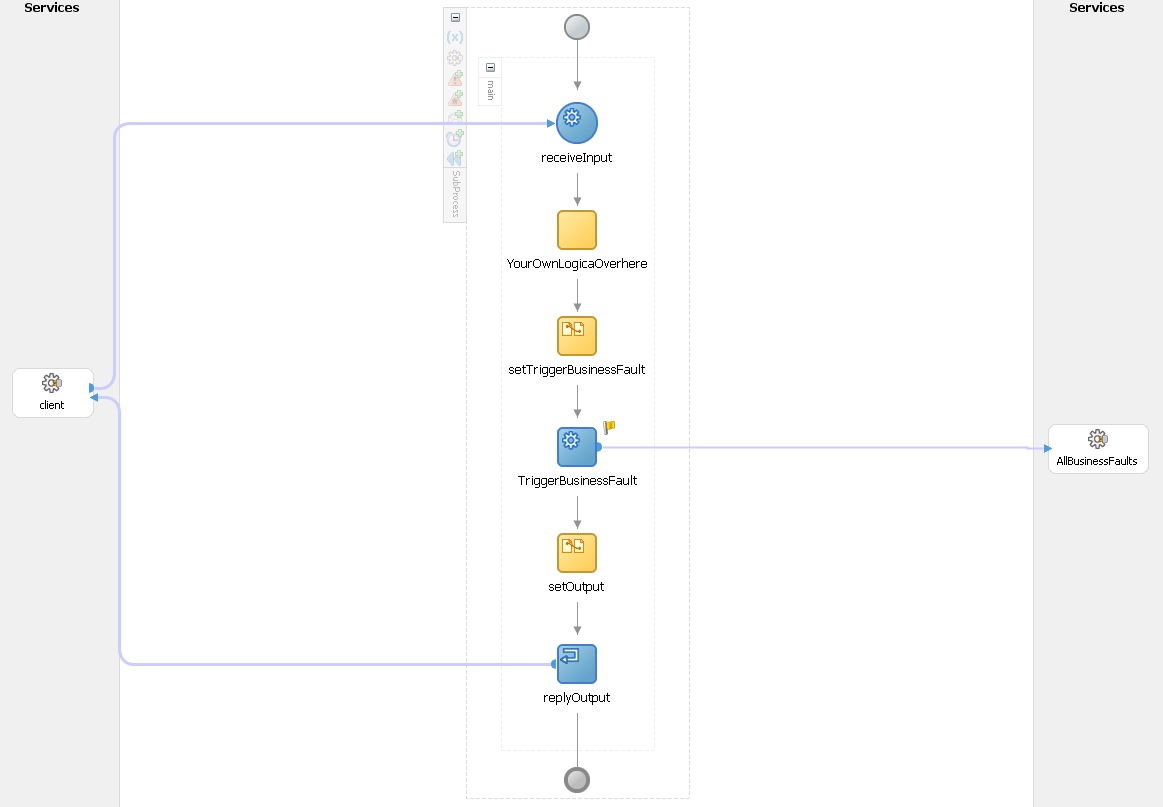
So we need atleast for this testscenario 2 bpel processes. One mainprocess which calls a subprocess, and this subprocess will throw the custom business fault.
This fault will get propogated back to the mainprocess and in here we will be able to let the framework handle the fault.
bpel-invoke
BPEL Processes
Mainprocess
mainprocess
Subprocess
subprocess
Just a simple invoke of the subprocess from the mainprocess. The subprocess with throw a fault, and this fault will be catched in the mainprocess.
throwThe fault to be thrown
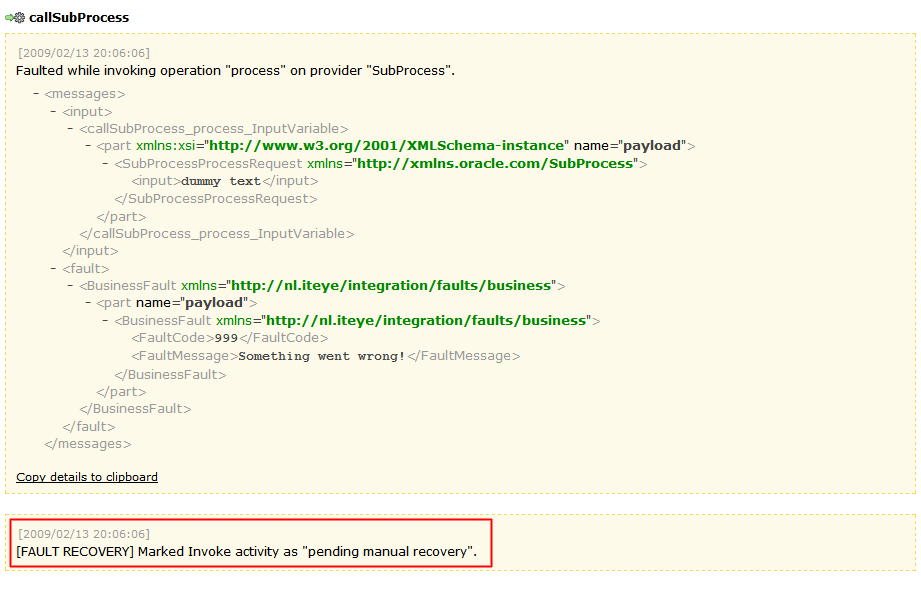
From the console start the mainprocess and wait till it comes back with a fault messageinvoke-faultedClick the activity to see the thrown fault
01.[2009/02/13 16:24:41]
02."{http://nl.iteye/integration/faults/business}BusinessFault" has been thrown.
03. 
05.<part name="payload">
07.<faultCode>999</faultCode>
08.<faultMessage>Something went wrong!</faultMessage>
09.</businessFault>
10.</part>
11.</businessFault>
Ok nice!
So the custom fault we defined in the subprocess reaches the mainprocess.
Now we need to config the fault policy framework so it will get active on our custom business fault.
From the fault we pasted above we need the faultname (BusinessFault) and the namespace (http://nl.iteye/integration/faults/business).
Edit /bpel/domains/default/config/fault-policies/DefaultPolicy.xml and add the next fault :
1.<faultName xmlns:flt="http://nl.iteye/integration/faults/business" name="flt:BusinessFault">
2.<condition>
3.<action ref="ora-human-intervention"/>
4.</condition>
5.</faultName>
For testing we will just let this fault getting handled by human-intervention.
Now restart the components
opmnctl stopall
opmnctl startall
Now start the mainprocess again and wait till it fails.
invoke-faulted-frameworkIt looks like the framework got active (activity yellow marked) on our custom business fault.
invoke-faulted-audit
Go to the activities-tab
list-activities
And click the activity which faulted.
edit-activity
Now we can edit some of the values and let the subprocess get re-invoked.
So, at this moment we’re able to throw our custom business faults and let them getting catched by the framework. Since the fault is only getting catched on the invoke of a partnerlink, we aren’t able to let our custom business fault getting throwned to the process in which we maybe want do something with the data for which we actually throwed the custom business fault. So maybe we want to stay in the subprocess and somehow get the custome business fault thrown inhere, let the framework catch it and update the values of this subprocess with new values an re-execute the subprocess.
The next solution will get this done.
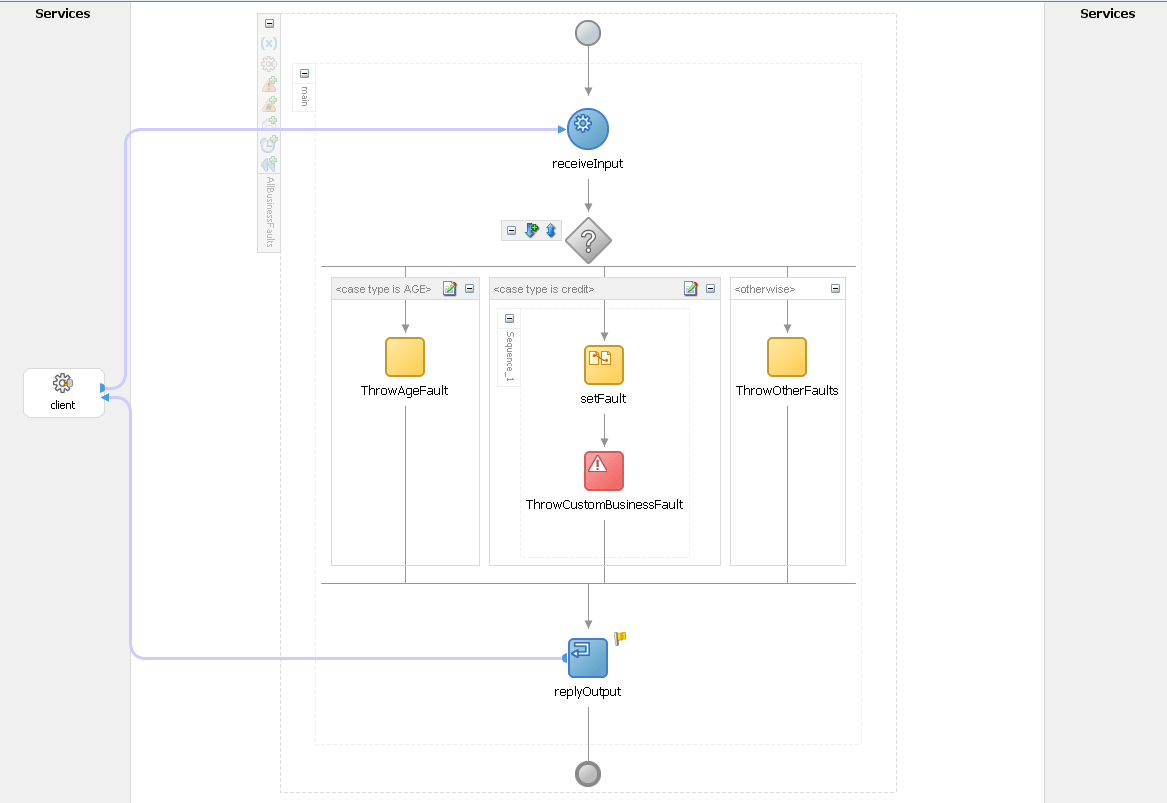
The mainprocess won’t get changed but in the subprocess we will invoke a new process called AllBusinessFaults.
New subprocess 2
subprocess2
AllBusinessFaults
all-business-faults
The AllBusinessFaults will throw the custom business fault we ‘request’ back on the invoke in this subprocess. Now it wil get catched by the framework and we will be able to change the values of the subprocess instead of the mainprocess.
list-activities2
By using the AllBusinessFaults bpel service like a sort of composite service, we can add the custom business faults in it and throw the one we would like to get thrown. This will work if the collection of custom business faults isn’t that big. I’m sure there will be better solutions for this, but for the scenario i wanted to describe inhere it was good enough for me.
Question
In the examples i provided i don’t use the fault-part of a synchronous invoke to propegate the soap-fault back to the caller, i just throw the fault. The bpel engine itself throws the fault back to the first-level. Whats best practice on this one ?
Sources
BPEL Sources (First part of article with mainprocess/subprocess)
BPEL Sources (Second part of article with mainprocess/subprocess/allbusinessfaults)
Resources
Oracle BPEL 10.1.3.3 Fault Policy Management

Wednesday, 22 August 2012

ErrorHandling in SOA 11g

In SOA 11g we can go for common error handling approach to capture fault at component and composite level.In this test cases I’ve one HelloWorld bpel process ,just prints hello.We cave another parent process,CallHelloWorldComposite that calls Hello process and here we’ll implement the fault policy.
To implement the Error Handler we need fault-policies.xml and fault-bindings.xml file.You can access those files locally from your project folder as well as from MDS or some other places.
image
Here in this case policies files are there in local project folder and in this case you need to just create those file and no entry in composite.xml is required.
But to access fault policy file from other places you need to add below properties in composite.xml,In this case I added policy at composite level.
image
You can give full path of either directory structure or MDS path in those values.
Now we need to design fault-policies.xml file to capture all kind of faults and actions need to be taken if error occurred.You can add your custom java code to perform any additional task like send email notification or enqueing data into custom error queue.Here is my fault-policies.xml file,
*******************************************************************************
<?xml version="1.0" encoding="UTF-8" ?>
<faultPolicies xmlns="http://schemas.oracle.com/bpel/faultpolicy">
  <faultPolicy version="2.0.1" id="commonErrorHandler"
               xmlns:env="http://schemas.xmlsoap.org/soap/envelope/"
               xmlns:xs="http://www.w3.org/2001/XMLSchema"
               xmlns="http://schemas.oracle.com/bpel/faultpolicy"
               xmlns:xsi="http://www.w3.org/2001/XMLSchema-instance">
    <Conditions>
      <faultName xmlns:bpelx="http://schemas.oracle.com/bpel/extension"
                 name="bpelx:remoteFault">
   
        <condition>
          <action ref="ora-retry"/>
        </condition>
      
     
      </faultName>
      <faultName xmlns:medns="http://schemas.oracle.com/mediator/faults"
                 name="medns:mediatorFault">
        <condition>
          <action ref="ora-cust"/>
        </condition>
      </faultName>
      <faultName xmlns:bpelx="http://schemas.oracle.com/bpel/extension"
                 name="bpelx:bindingFault">
        <condition>
          <action ref="ora-errorQ"/>
        </condition>
      </faultName>
      <faultName xmlns:bpelx="http://schemas.oracle.com/bpel/extension"
                 name="bpelx:runtimeFault">
        <condition>
          <action ref="ora-errorQ"/>
        </condition>
      </faultName>
    </Conditions>
    <Actions>
      <Action id="ora-terminate">
        <abort/>
      </Action>
      <Action id="ora-rethrow-fault">
        <rethrowFault/>
      </Action>
      <Action id="ora-replay-scope">
        <replayScope/>
      </Action>
      <Action id="ora-human-intervention">
        <humanIntervention/>
      </Action>
      <Action id="ora-retry">
        <retry>
          <retryCount>3</retryCount>
          <retryInterval>2</retryInterval>
          <exponentialBackoff/>
          <retryFailureAction ref="send-notification"/>
          <retrySuccessAction ref="ora-errorQ"/>
        </retry>
      </Action>
      <Action id="ora-cust">
        <javaAction className="com.shrik.TestJavaAction"
                    defaultAction="ora-terminate"
                    propertySet="send-notification-properties">
          <returnValue value="REPLAY" ref="ora-terminate"/>
          <returnValue value="RETRHOW" ref="ora-rethrow-fault"/>
          <returnValue value="ABORT" ref="ora-terminate"/>
          <returnValue value="RETRY" ref="ora-retry"/>
          <returnValue value="MANUAL" ref="ora-human-intervention"/>
        </javaAction>
      </Action>
      <Action id="ora-errorQ">
        <javaAction className="com.shrik.ErrorHospitalQueue"
                    defaultAction="ora-terminate"
                    propertySet="enqueue-properties">
          <returnValue value="REPLAY" ref="ora-terminate"/>
          <returnValue value="RETRHOW" ref="ora-rethrow-fault"/>
          <returnValue value="ABORT" ref="ora-terminate"/>
          <returnValue value="RETRY" ref="ora-retry"/>
          <returnValue value="MANUAL" ref="ora-human-intervention"/>
        </javaAction>
      </Action>
      <Action id="send-notification">
        <javaAction className="com.shrik.ErrorHospitalNotification"
                    defaultAction="ora-human-intervention"
                    propertySet="send-notification-properties">
          <returnValue value="MANUAL" ref="ora-human-intervention"/>
        </javaAction>
      </Action>
    </Actions>
    <!-- Property sets used by custom Java actions -->
    <Properties>
      <propertySet name="send-notification-properties">
        <property name="from"><Give from address></property>
        <property name="to"><Give To Address></property>
        <property name="subject">Test Mail</property>
        <property name="text">Environment: TEST</property>
        <property name="host"><smtp host server></property>
        <property name="port"><smtp port></property>
        <property name="username"><user name></property>
        <property name="password"><password></property>
      </propertySet>
      <propertySet name="enqueue-properties">
        <property name="aq.queueconnectionfactory">aqjms/XAQueueConnectionFactory</property>
          <property name="aq.queue">jms/errorQ</property>
      </propertySet>
    </Properties>
  </faultPolicy>
</faultPolicies>
****************************************************************************************
and here is my fault-bindings.xml file,
<?xml version="1.0" encoding="UTF-8" ?>
<faultPolicyBindings version="2.0.1"
                     xmlns="http://schemas.oracle.com/bpel/faultpolicy"
                     xmlns:xsi="http://www.w3.org/2001/XMLSchema-instance">
  <composite faultPolicy="commonErrorHandler"/>
</faultPolicyBindings>

****************************************************************************************
If HelloWorld endpoint is unreachable then  bpelx:remoteFault will happen and as per fault policy it will execure ora-retry action,will try to retry the endpoint 3 times in 2,4,8 seconds intervals and upon subsequent failure it will invoke com.shrik.ErrorHospitalNotification class with send-notification-properties to notify faults to users.
To write your custom java code,create a new project like,
image
in this project we need to import some jars from <OracleMiddlewareHome>/Oracle_SOA1/soa/modules/oracle.soa.bpel_11.1.1 ,oracle.soa.fabric_11.1.1 directory.
For my case here is the code excerpt ,
For sending email notification from fault policy(ErrorHospitalNotification.java),
****************************************************************************************
package com.shrik;
import com.collaxa.cube.engine.fp.BPELFaultRecoveryContextImpl;

import java.util.ArrayList;
import java.util.Map;
import java.util.Properties;
import javax.mail.Authenticator;
import javax.mail.Message;
import javax.mail.MessagingException;
import javax.mail.PasswordAuthentication;
import javax.mail.Session;
import javax.mail.Transport;
import javax.mail.internet.AddressException;
import javax.mail.internet.InternetAddress;
import javax.mail.internet.MimeMessage;
import oracle.integration.platform.faultpolicy.IFaultRecoveryContext;
import oracle.integration.platform.faultpolicy.IFaultRecoveryJavaClass;

public class ErrorHospitalNotification implements IFaultRecoveryJavaClass {
    private String from;
    private String to;
    private String subject;
    private String text;
    private String host;
    private String port;
    private String username;
    private String password;
    private Properties props;
    public ErrorHospitalNotification() {
        super();
    }
    private void sendMail() {
        props = new Properties();
        props.put("mail.smtp.host", getHost());
        props.put("mail.smtp.port", getPort());
        props.put("mail.transport.protocol", "smtp");
        props.setProperty("mail.smtps.quitwait", "false");
        props.put("mail.smtp.auth", "true");
        Authenticator auth = new javax.mail.Authenticator() {
            protected PasswordAuthentication getPasswordAuthentication() {
                return new PasswordAuthentication(getUsername(),
                                                  getPassword());
            }
        };
        Session mailSession = Session.getDefaultInstance(props, auth);
        Message simpleMessage = new MimeMessage(mailSession);
        try {
            InternetAddress fromAddress = new InternetAddress(from);
            simpleMessage.setFrom(fromAddress);
            String toAddresses[] = to.split(";");
            if (toAddresses != null && toAddresses.length > 0) {
                InternetAddress toInternetAddresses[] =
                    new InternetAddress[toAddresses.length];
                for (int i = 0; i < toAddresses.length; i++)
                    toInternetAddresses[i] =
                            new InternetAddress(toAddresses[i]);
                simpleMessage.setRecipients(javax.mail.Message.RecipientType.TO,
                                            toInternetAddresses);
            }
            simpleMessage.setSubject(subject);
            simpleMessage.setText(text);
            Transport.send(simpleMessage);
        } catch (AddressException e) {
            System.out.println("Error formatting Internet Email Address: " +
                               e.getMessage().toString());
            e.printStackTrace();
        } catch (MessagingException e) {
            System.out.println("Error sending email: " +
                               e.getMessage().toString());
            e.printStackTrace();
        }
    }
    private String getParameterValue(ArrayList parameterList) {
        String value = null;
        if (parameterList != null && parameterList.size() > 0)
            value = (String)parameterList.get(0);
        return value;
    }
    public void handleRetrySuccess(IFaultRecoveryContext iFaultRecoveryContext) {
        BPELFaultRecoveryContextImpl bpelCtx =
            (BPELFaultRecoveryContextImpl)iFaultRecoveryContext;
        Map properties = iFaultRecoveryContext.getProperties();
        if (properties != null && properties.size() == 8) {
            setFrom(getParameterValue((ArrayList)properties.get("from")));
            setTo(getParameterValue((ArrayList)properties.get("to")));
            setSubject(getParameterValue((ArrayList)properties.get("subject")) +
                       " " + "Retry Success");
            setText("The exception that occurred when processing " +
                    bpelCtx.getTitle() + " was successfully retried.\n" +
                    "This message was automatically generated, please do not reply to it.");
            setHost(getParameterValue((ArrayList)properties.get("host")));
            setPort(getParameterValue((ArrayList)properties.get("port")));
            setUsername(getParameterValue((ArrayList)properties.get("username")));
            setPassword(getParameterValue((ArrayList)properties.get("password")));
            sendMail();
        }
    }

    public String handleFault(IFaultRecoveryContext iFaultRecoveryContext) {
        Map properties = iFaultRecoveryContext.getProperties();
        BPELFaultRecoveryContextImpl bpelCtx =
            (BPELFaultRecoveryContextImpl)iFaultRecoveryContext;
        if (properties != null && properties.size() == 8) {
            setFrom(getParameterValue((ArrayList)properties.get("from")));
            setTo(getParameterValue((ArrayList)properties.get("to")));
            setSubject(getParameterValue((ArrayList)properties.get("subject")) +
                       bpelCtx.getTitle());
            setText(getParameterValue((ArrayList)properties.get("text")) +
                    "BPEL Process Instance: " + bpelCtx.getInstanceId() +
                    " needs intervention to recover from a technical exception: " +
                    bpelCtx.getFault().getMessage() +
                    "Check the Activities tab in the BPEL Management Console in order to resolve the error as soon as possible. This message was automatically generated, please do not reply to it.");
            setHost(getParameterValue((ArrayList)properties.get("host")));
            setPort(getParameterValue((ArrayList)properties.get("port")));
            setUsername(getParameterValue((ArrayList)properties.get("username")));
            setPassword(getParameterValue((ArrayList)properties.get("password")));
            bpelCtx.addAuditTrailEntry("Sending Email...");
            sendMail();
        }
        return "MANUAL";
    }

    public void setFrom(String from) {
        this.from = from;
    }
    public String getFrom() {
        return from;
    }
    public void setTo(String to) {
        this.to = to;
    }
    public String getTo() {
        return to;
    }
    public void setSubject(String subject) {
        this.subject = subject;
    }
    public String getSubject() {
        return subject;
    }
    public void setText(String text) {
        this.text = text;
    }
    public String getText() {
        return text;
    }
    public void setHost(String host) {
        this.host = host;
    }
    public String getHost() {
        return host;
    }
    public void setPort(String port) {
        this.port = port;
    }
    public String getPort() {
        return port;
    }
    public void setProps(Properties props) {
        this.props = props;
    }
    public Properties getProps() {
        return props;
    }
    public void setUsername(String username) {
        this.username = username;
    }
    public String getUsername() {
        return username;
    }
    public void setPassword(String password) {
        this.password = password;
    }
    public String getPassword() {
        return password;
    }
}
****************************************************************************************
Now your custom java code should be referenced by weblogic server,For that,
  1. Create a jar file containing all your custom java code.
  2. Place the jar file in <OracleMiddlewareHome>/Oracle_SOA1/soa/modules/oracle.soa.ext_11.1.1 directory.
  3. Make sure ANT/bin is set in your classpath.
  4. and just run ant from that directory and eventually it will generate oracle.soa.ext.jar file.
  5. Start the weblogic server.
Now deploy the HelloWorld and caller process and turn helloworld endpoint off from em.
Now when you run CallHelloWorldComposite then definitely it will throw remote fault and parse your fault policy file.
After retrying it will send notification and go to manual intervention for recovery.
You can extend your Error Handling Framework as per your project need.

Thursday, 26 July 2012

Fault-policy frame work in SOA 11g


In this post we will discuss the fault-policy framework in SOA 11g.
Conceptual wise no changes in this release when compare to 10g. But some changes are there in placing these files and etc.

First of all this framework will work only for the faults at invoke activity.
To implement fault-policy framework we have to have two xml files called fault-bindings.xml and fault-policies.xml.

A fault policy bindings file associates the policies defined in a fault policy file with the SOA composite application or the component.

A fault policy file defines fault conditions and their corresponding fault recovery actions. Each fault condition specifies a particular fault or group of faults, which it attempts to handle, and the corresponding action for it.
And these files should be created based on below XML schema.

http://download.oracle.com/docs/cd/E12839_01/integration.1111/e10224/med_faulthandling.htm#BABJGAEI

We can have these xml files in the same directory as the composite.xml file of the SOA composite application or we can place it in a different location and access those by using below properties in composite.xml

oracle.composite.faultPolicyFile
oracle.composite.faultBindingFile

Ex:
<property name="oracle.composite.faultPolicyFile">oramds:/apps/components/faultpolicies/fault-Policies.xml
</property>
<property
name="oracle.composite.faultBindingFile">oramds://apps/components/faultpolicyfiles/fault-bindings.xml
</property>
Below diagram shows how BPEL process behaves when we use fault-policy frame-work.

So when we are using this framework, it takes precedence over catch and catchAll blocks in BPEL.
 
Below are the sample fault-policies and fault-bindings.xml

fault-policies.xml :

<?xml version="1.0" encoding="UTF-8"?>
<faultPolicies xmlns="http://schemas.oracle.com/bpel/faultpolicy"
xmlns:bpelx="http://schemas.oracle.com/bpel/extension"
xmlns:xsi="http://www.w3.org/2001/XMLSchema-instance"
<faultPolicy version="2.0.1" id="PannPolicy1">
<Conditions>
<faultName xmlns:bpelx="http://schemas.oracle.com/bpel/extension" name="bpelx:remoteFault">
<condition>
<action ref="ora-terminate"/>
</condition>
</faultName>
<faultName xmlns:bpelx="http://schemas.oracle.com/bpel/extension" name="bpelx:bindingFault">
<condition>
<action ref="ora-retry"/>
</condition>
<condition>
<action ref="ora-human-intervention"/>
</condition>
</faultName>
</Conditions>
<Actions>
<Action id="ora-terminate">
<abort/>
</Action>
<Action id="ora-retry">
<retry>
<retryCount>2</retryCount>
<retryInterval>2</retryInterval>
<exponentialBackoff/>
</retry>
</Action>
<Action id="ora-human-intervention">
<humanIntervention/>
</Action>
</Actions>
</faultPolicy>
</faultPolicies>

 fault-bindings.xml:

<?xml version="1.0" encoding="UTF-8"?>
<faultPolicyBindings version="2.0.1" xmlns="http://schemas.oracle.com/bpel/faultpolicy"

<composite faultPolicy=" PannPolicy 1"/>
<component faultPolicy=" PannPolicy 1 ">
<name>TestProcess</name>
</component>
<component faultPolicy=" PannPolicy 1 ">
<name>SecondProcess</name>
</component>
</faultPolicyBindings>

Infault-policies.xml condition section, we can have actions based on the evaluation of fault-variable available on the fault. Like below.

<condition>
<test>$fault.code="ABC Error"</test>
<action ref="ora-terminate"/>
</condition>

Some predefind actions were provided by oracle are:

retry
human-intervention
replay
rethrow
terminate
javaAction

We will see how to use custom java code in fault-policy framework in coming posts.

Regards
Saileshan

Exception handling; fault management and priority messages


Introduction

Exception handling is often a topic which is paid too little attention to. Functional people often consider this a technical topic and technical people consider the handling of error situations to mostly be functional in nature. This difference in opinion can result in software going to a production environment which is difficult to maintain.

It is suggested to first read the following two articles to understand the background of this article;
http://javaoraclesoa.blogspot.nl/2012/05/exception-handling-in-soa-suite-10g-and.html
http://javaoraclesoa.blogspot.nl/2012/05/re-enqueueing-faulted-bpel-messages.html

The below article describes a combination of exception handling by using a custom Java class in a fault policy to retire the process and a BPEL catch branch to reenqueue a message with a higher priority.

The implementation will satisfy the following requirements;

If an error occurs
- the process will be retired to prevent future faults in case a service invocation fails (fault management framework and custom Java fault handler)
- the faulted message must be put on a queue so it can easily be re-offered to the process after the error has been resolved (catch branch in BPEL using AQ adapter to re-enqueue a message)
- the faulted message must be picked up before the other messages in the queue if the problem is fixed in order to retain the order of messages processed (AQ with sorting on priority)

The fault management framework

Summary

The fault management framework does not handle all exceptions which occur but only invoke exceptions. The fault management framework takes precedence over the BPEL catch branch. The fault management framework makes it easy to use custom Java fault handlers to for example retire a process.

The BPEL catch branch does not allow a custom Java class to handle the exception. You can however use Java embedding. See for an example; http://javaoraclesoa.blogspot.nl/2012/03/base64encode-and-base64decode-in-bpel.html. Mind that when an exception is rethrown in a Catch branch and a CatchAll branch is present on the same level, the exception is propagated to the higher level and not caught by the CatchAll branch!

Example

The following example will retire a process when errors occur in invoke activities. The rethrow action makes sure that after the process has been retired, the error is propagated to the catch activities in the BPEL process.

The following code can be put in the <SCA-project>/SCA-INF/src/ms/exceptiontest.soa.faultHandlers folder;

package ms.exceptiontest.soa.faultHandlers;

import com.collaxa.cube.engine.fp.BPELFaultRecoveryContextImpl;
import java.util.logging.Logger;
import oracle.integration.platform.faultpolicy.IFaultRecoveryContext;
import oracle.integration.platform.faultpolicy.IFaultRecoveryJavaClass;
import oracle.soa.management.facade.Composite;
import oracle.soa.management.facade.Locator;
import oracle.soa.management.facade.LocatorFactory;

public class retireFaultHandler implements IFaultRecoveryJavaClass {
    private final static Logger logger =
        Logger.getLogger(retireFaultHandler.class.getName());

    public void handleRetrySuccess(IFaultRecoveryContext iFaultRecoveryContext) {
    }

    public String handleFault(IFaultRecoveryContext iFaultCtx) {
        try {
            BPELFaultRecoveryContextImpl bpelCtx =
                (BPELFaultRecoveryContextImpl)iFaultCtx;
            Locator loc = LocatorFactory.createLocator();
            Composite comp =
                loc.lookupComposite(bpelCtx.getProcessDN().getCompositeDN());
            comp.retire();
            System.out.println("retired " + comp.getDN());

        } catch (Exception e) {
            logger.severe("Error in FaultHandler " +
                          retireFaultHandler.class.getName());
            e.printStackTrace();
        }
        return "OK";
    }
}

Then you can use the following fault-policies.xml

<?xml version="1.0" encoding="UTF-8"?>
<faultPolicies xmlns="http://schemas.oracle.com/bpel/faultpolicy"
               xmlns:xsi="http://www.w3.org/2001/XMLSchema-instance">
  <faultPolicy version="2.1.3" id="ConnectionFaults">
    <Conditions>
      <faultName>
        <condition>
          <action ref="retireProcess"/>
        </condition>
      </faultName>
    </Conditions>
    <Actions>
      <Action id="retireProcess">
        <javaAction className="ms.exceptiontest.soa.faultHandlers.retireFaultHandler"
                    defaultAction="ora-rethrow-fault">
          <returnValue value="OK" ref="ora-rethrow-fault"/>
        </javaAction>
      </Action>
      <!-- Generics -->
      <Action id="ora-terminate">
        <abort/>
      </Action>
      <Action id="ora-replay-scope">
        <replayScope/>
      </Action>
      <Action id="ora-rethrow-fault">
        <rethrowFault/>
      </Action>
      <Action id="ora-human-intervention">
        <humanIntervention/>
      </Action>
    </Actions>
  </faultPolicy>
</faultPolicies>

And fault-bindings.xml

<?xml version="1.0" encoding="UTF-8"?>
<faultPolicyBindings version="2.0.1"
                     xmlns="http://schemas.oracle.com/bpel/faultpolicy"
                     xmlns:xsi="http://www.w3.org/2001/XMLSchema-instance">
    <composite faultPolicy="ConnectionFaults"/>
</faultPolicyBindings>

Re-enqueue messages using a higher priority

PL/SQL queue code

To be able to re-enqueue messages using a higher priority, a multiconsumer queue is created. Creating a multiconsumer queue is not required but allows more flexibility since multiple parties can become subscriber on the queue.

The queue uses a sort_list of priority,enq_time making sure messages with higher priority are dequeued first. The retention time is set to 1 week since even if messages are dequeued, it is handy if we can still find them to check their contents. The user holding the queues (and queue package), should have the following grants;

GRANT EXECUTE ON DBMS_AQADM TO testuser;
GRANT EXECUTE ON DBMS_AQ TO testuser;
GRANT AQ_ADMINISTRATOR_ROLE TO testuser;

--creating queue tables
BEGIN
  DBMS_AQADM.CREATE_QUEUE_TABLE( Queue_table => '"TESTUSER"."SOA_MULTI_QT"', Queue_payload_type => 'SYS.XMLTYPE', Sort_list => 'PRIORITY,ENQ_TIME', Multiple_consumers => TRUE, Compatible => '8.1.3');
END;

--creating queues
BEGIN
  DBMS_AQADM.CREATE_QUEUE( Queue_name => 'TESTUSER.SOA_MULTI_QUEUE', Queue_table => 'TESTUSER.SOA_MULTI_QT', Queue_type => 0, Max_retries => 5, Retry_delay => 0, Retention_time => '604800', dependency_tracking => FALSE, COMMENT => 'multi queue');
END;

--adding subscribers
begin
DBMS_AQADM.ADD_SUBSCRIBER ('TESTUSER.SOA_MULTI_QUEUE',sys.aq$_agent('FAULTTEST', null, null));
DBMS_AQADM.Start_queue( Queue_name => 'TESTUSER.SOA_MULTI_QUEUE',TRUE,TRUE );
end;

To drop the queue, queuetable, etc, the following can be used

BEGIN
  DBMS_AQADM.Stop_queue( Queue_name => 'TESTUSER.SOA_MULTI_QUEUE' );
  DBMS_AQADM.DROP_QUEUE( Queue_name => 'TESTUSER.SOA_MULTI_QUEUE' );
  DBMS_AQADM.DROP_QUEUE_TABLE( Queue_table => '"TESTUSER"."SOA_MULTI_QT"');
END;

To allow other users to enqueue messages without having to grant them rights to the DBMS_AQ package, the following package can be used;

CREATE OR REPLACE
PACKAGE soa_queue_pack
IS
type t_recipients_list IS TABLE OF VARCHAR2 (50); -- index by binary_integer;

PROCEDURE vul_multi_queue(
    p_queue_naam      IN VARCHAR2 ,
    p_xml_payload     IN xmltype ,
    p_priority        IN BINARY_INTEGER ,
    p_recipients_list IN t_recipients_list);
END soa_queue_pack;

create or replace
PACKAGE BODY soa_queue_pack
IS
PROCEDURE vul_multi_queue(
    p_queue_naam      IN VARCHAR2 ,
    p_xml_payload     IN xmltype ,
    p_priority        IN BINARY_INTEGER ,
    p_recipients_list IN t_recipients_list )
IS
  l_msg_aq raw(18);
  l_enq_opt dbms_aq.enqueue_options_t;
  l_msg_prop dbms_aq.message_properties_t;
  l_recipients_list dbms_aq.aq$_recipient_list_t;
BEGIN
  FOR i IN p_recipients_list.FIRST .. p_recipients_list.LAST
  LOOP
    l_recipients_list(i) := sys.aq$_agent(p_recipients_list(i),NULL,NULL);
  END LOOP;
  l_msg_prop.priority       := p_priority;
  l_msg_prop.recipient_list := l_recipients_list;
  dbms_aq.enqueue(p_queue_naam, l_enq_opt, l_msg_prop, p_xml_payload, l_msg_aq);
END;
END;

Other users can then do the following to enqueue messages ('testuser' is the user who owns the package and queues);

DECLARE
l_recipients          testuser.soa_queue_pack.t_recipients_list;
l_message_id RAW(16);
l_message SYS.XMLType;
BEGIN
l_recipients := testuser.soa_queue_pack.t_recipients_list('FAULTTEST');
l_message := sys.XMLType.createXML('<itemCollectionArray xmlns:msg_out="http://test.ms/itemcollections" xmlns="http://test.ms/itemcollections"><msg_out:itemsCollection><msg_out:item><msg_out:name>name</msg_out:name><msg_out:value>Piet</msg_out:value></msg_out:item></msg_out:itemsCollection></itemCollectionArray>');
testuser.soa_queue_pack.vul_multi_queue('TESTUSER.SOA_MULTI_QUEUE',l_message,5,l_recipients);
END;

This can for example be used in a PL/SQL table trigger in a different schema to enqueue a message on a certain status change or insert.

BPEL dequeueing and enqueueing

In BPEL you can specify the consumer a property in the AQ wizard for the dequeue operation;


For enqueueing, you can specify the enqueue priority to for example make sure messages causing errors, are picked up first when the problem is fixed.


To make sure no loops are caused and to throttle the speed at which messages are processed by the AQ adapter, the following properties can be used in the composite.xml;

  <service name="soa_multi_queue_AQ"
           ui:wsdlLocation="soa_multi_queue_AQ.wsdl">
    <interface.wsdl interface="http://xmlns.oracle.com/pcbpel/adapter/aq/bpel/multiqueue/soa_multi_queue_AQ#wsdl.interface(Dequeue_ptt)"/>
    <binding.jca config="soa_multi_queue_AQ_aq.jca"/>
    <property name="minimumDelayBetweenMessages">10000</property>
    <property name="adapter.aq.dequeue.threads" type="xs:string" many="false">1</property>
  </service>

The above setting causes 1 message every 10 seconds to be picked up from the queue.

Demonstration

The following BPEL process has been created;
This process calls an HelloWorld webservice. This webservice can be shutdown or retired in order to simulate a RemoteException (failure to invoke the webservice). The fault policy will call the custom Java action to retire the process. After retirement, the fault is rethrown and caught by the catchall block. This will re-enqueue the message with a higher priority. Upon fixing the error and enabling the process, the faulted message is picked up first and processed correctly.

First a message is put on the queue by executing;
DECLARE
l_recipients          testuser.soa_queue_pack.t_recipients_list;
l_message_id RAW(16);
l_message SYS.XMLType;
BEGIN
l_recipients := testuser.soa_queue_pack.t_recipients_list('FAULTTEST');
l_message := sys.XMLType.createXML('<itemCollectionArray xmlns:msg_out="http://test.ms/itemcollections" xmlns="http://test.ms/itemcollections"><msg_out:itemsCollection><msg_out:item><msg_out:name>name</msg_out:name><msg_out:value>Piet</msg_out:value></msg_out:item></msg_out:itemsCollection></itemCollectionArray>');
testuser.soa_queue_pack.vul_multi_queue('TESTUSER.SOA_MULTI_QUEUE',l_message,5,l_recipients);
END;

Then confirm the message is processed succesfully;

Next, disable the HelloWorld service by retiring it and re-enqueue a message. Check how CallHelloWorld handles the exception. The process is retired and the message is re-enqueued with a higher priority.


You can also confirm that after enabling the HelloWorld service and Activating the CallHelloWorld process, it first picks up the faulted message. You can download the sample (BPEL/Java code) at; http://dl.dropbox.com/u/6693935/blog/ExceptionTest.zip

Monday, 23 July 2012

soa 11.1.1.6 installation

Well 11.1.1.6 is now available for download so I thought I would build a Windows Server environment to run it.  I will minimize the memory footprint of the installation by putting all functionality into the Admin Server of the SOA Suite domain.

Required Software

  • 64-bit JDK
  • SOA Suite
    • If you want 64-bit then choose “Generic” rather than “Microsoft Windows 32bit JVM” or “Linux 32bit JVM”
    • This has links to all the required software.
    • If you choose “Generic” then the Repository Creation Utility link does not show, you still need this so change the platform to “Microsoft Windows 32bit JVM” or “Linux 32bit JVM” to get the software.
    • Similarly if you need a database then you need to change the platform to get the link to XE for Windows or Linux.
If possible I recommend installing a 64-bit JDK as this allows you to assign more memory to individual JVMs.
Windows XE will work, but it is better if you can use a full Oracle database because of the limitations on XE that sometimes cause it to run out of space with large or multiple SOA deployments.

Installation Steps

The following flow chart outlines the steps required in installing and configuring SOA Suite.

The steps in the diagram are explained below.

64-bit?

Is a 64-bit installation required?  The Windows & Linux installers will install 32-bit versions of the Sun JDK and JRockit.  A separate JDK must be installed for 64-bit.

Install 64-bit JDK

The 64-bit JDK can be either Hotspot or JRockit.  You can choose either JDK 1.7 or 1.6.

Install WebLogic

If you are using 64-bit then install WebLogic using “java –jar wls1036_generic.jar”.  Make sure you include Coherence in the installation, the easiest way to do this is to accept the “Typical” installation.

SOA Suite Required?

If you are not installing SOA Suite then you can jump straight ahead and create a WebLogic domain.

Install SOA Suite

Run the SOA Suite installer and point it at the existing Middleware Home created for WebLogic.  Note to run the SOA installer on Windows the user must have admin privileges.  I also found that on Windows Server 2008R2 I had to start the installer from a command prompt with administrative privileges, granting it privileges when it ran caused it to ignore the jreLoc parameter.

Database Available?

Do you have access to a database into which you can install the SOA schema.  SOA Suite requires access to an Oracle database (it is supported on other databases but I would always use an oracle database).

Install Database

I use an 11gR2 Oracle database to avoid XE limitations.  Make sure that you set the database character set to be unicode (AL32UTF8).  I also disabled the new security settings because they get in the way for a developer database.  Don’t forget to check that number of processes is at least 150 and number of sessions is not set, or is set to at least 200 (in the DB init parameters).

Run RCU

The SOA Suite database schemas are created by running the Repository Creation Utility.  Install the “SOA and BPM Infrastructure” component to support SOA Suite.  If you keep the schema prefix as “DEV” then the config wizard is easier to complete.

Run Config Wizard

The Config wizard creates the domain which hosts the WebLogic server instances.  To get a minimum footprint SOA installation choose the “Oracle Enterprise Manager” and “Oracle SOA Suite for developers” products.  All other required products will be automatically selected.
The “for developers” installs target the appropriate components at the AdminServer rather than creating a separate managed server to house them.  This reduces the number of JVMs required to run the system and hence the amount of memory required.  This is not suitable for anything other than a developer environment as it mixes the admin and runtime functions together in a single server.  It also takes a long time to load all the required modules, making start up a slow process.

If it exists I would recommend running the config wizard found in the “oracle_common/common/bin” directory under the middleware home.  This should have access to all the templates, including SOA.
If you also want to run BAM in the same JVM as everything else then you need to “Select Optional Configuration” for “Managed Servers, Clusters and Machines”.

To target BAM at the AdminServer delete the “bam_server1” managed server that is created by default.  This will result in BAM being targeted at the AdminServer.

Installation Issues

I had a few problems when I came to test everything in my mega-JVM.
  • Following applications were not targeted and so I needed to target them at the AdminServer:
    • b2bui
    • composer
    • Healthcare UI
    • FMW Welcome Page Application (11.1.0.0.0)

How Memory Efficient is It?

On a Windows 2008R2 Server running under VirtualBox I was able to bring up both the 11gR2 database and SOA/BPM/BAM in 3G memory.  I allocated a minimum 512M to the PermGen and a minimum of 1.5G for the heap.  The setting from setSOADomainEnv are shown below:
set DEFAULT_MEM_ARGS=-Xms1536m -Xmx2048m
set PORT_MEM_ARGS=-Xms1536m -Xmx2048m
set DEFAULT_MEM_ARGS=%DEFAULT_MEM_ARGS% -XX:PermSize=512m -XX:MaxPermSize=768m
set PORT_MEM_ARGS=%PORT_MEM_ARGS% -XX:PermSize=512m -XX:MaxPermSize=768m
I arrived at these numbers by monitoring JVM memory usage in JConsole.
Task Manager showed total system memory usage at 2.9G – just below the 3G I allocated to the VM.
Performance is not stellar but it runs and I could run JDeveloper alongside it on my 8G laptop, so in that sense it was a result!

Sunday, 15 July 2012

ErrorHandling in SOA 11g


In SOA 11g we can go for common error handling approach to capture fault at component and composite level.In this test cases I’ve one HelloWorld bpel process ,just prints hello.We cave another parent process,CallHelloWorldComposite that calls Hello process and here we’ll implement the fault policy.
To implement the Error Handler we need fault-policies.xml and fault-bindings.xml file.You can access those files locally from your project folder as well as from MDS or some other places.
image
Here in this case policies files are there in local project folder and in this case you need to just create those file and no entry in composite.xml is required.
But to access fault policy file from other places you need to add below properties in composite.xml,In this case I added policy at composite level.
image
You can give full path of either directory structure or MDS path in those values.
Now we need to design fault-policies.xml file to capture all kind of faults and actions need to be taken if error occurred.You can add your custom java code to perform any additional task like send email notification or enqueing data into custom error queue.Here is my fault-policies.xml file,
*******************************************************************************
<?xml version="1.0" encoding="UTF-8" ?>
<faultPolicies xmlns="http://schemas.oracle.com/bpel/faultpolicy">
  <faultPolicy version="2.0.1" id="commonErrorHandler"
               xmlns:env="http://schemas.xmlsoap.org/soap/envelope/"
               xmlns:xs="http://www.w3.org/2001/XMLSchema"
               xmlns="http://schemas.oracle.com/bpel/faultpolicy"
               xmlns:xsi="http://www.w3.org/2001/XMLSchema-instance">
    <Conditions>
      <faultName xmlns:bpelx="http://schemas.oracle.com/bpel/extension"
                 name="bpelx:remoteFault">
   
        <condition>
          <action ref="ora-retry"/>
        </condition>
      
     
      </faultName>
      <faultName xmlns:medns="http://schemas.oracle.com/mediator/faults"
                 name="medns:mediatorFault">
        <condition>
          <action ref="ora-cust"/>
        </condition>
      </faultName>
      <faultName xmlns:bpelx="http://schemas.oracle.com/bpel/extension"
                 name="bpelx:bindingFault">
        <condition>
          <action ref="ora-errorQ"/>
        </condition>
      </faultName>
      <faultName xmlns:bpelx="http://schemas.oracle.com/bpel/extension"
                 name="bpelx:runtimeFault">
        <condition>
          <action ref="ora-errorQ"/>
        </condition>
      </faultName>
    </Conditions>
    <Actions>
      <Action id="ora-terminate">
        <abort/>
      </Action>
      <Action id="ora-rethrow-fault">
        <rethrowFault/>
      </Action>
      <Action id="ora-replay-scope">
        <replayScope/>
      </Action>
      <Action id="ora-human-intervention">
        <humanIntervention/>
      </Action>
      <Action id="ora-retry">
        <retry>
          <retryCount>3</retryCount>
          <retryInterval>2</retryInterval>
          <exponentialBackoff/>
          <retryFailureAction ref="send-notification"/>
          <retrySuccessAction ref="ora-errorQ"/>
        </retry>
      </Action>
      <Action id="ora-cust">
        <javaAction className="com.shrik.TestJavaAction"
                    defaultAction="ora-terminate"
                    propertySet="send-notification-properties">
          <returnValue value="REPLAY" ref="ora-terminate"/>
          <returnValue value="RETRHOW" ref="ora-rethrow-fault"/>
          <returnValue value="ABORT" ref="ora-terminate"/>
          <returnValue value="RETRY" ref="ora-retry"/>
          <returnValue value="MANUAL" ref="ora-human-intervention"/>
        </javaAction>
      </Action>
      <Action id="ora-errorQ">
        <javaAction className="com.shrik.ErrorHospitalQueue"
                    defaultAction="ora-terminate"
                    propertySet="enqueue-properties">
          <returnValue value="REPLAY" ref="ora-terminate"/>
          <returnValue value="RETRHOW" ref="ora-rethrow-fault"/>
          <returnValue value="ABORT" ref="ora-terminate"/>
          <returnValue value="RETRY" ref="ora-retry"/>
          <returnValue value="MANUAL" ref="ora-human-intervention"/>
        </javaAction>
      </Action>
      <Action id="send-notification">
        <javaAction className="com.shrik.ErrorHospitalNotification"
                    defaultAction="ora-human-intervention"
                    propertySet="send-notification-properties">
          <returnValue value="MANUAL" ref="ora-human-intervention"/>
        </javaAction>
      </Action>
    </Actions>
    <!-- Property sets used by custom Java actions -->
    <Properties>
      <propertySet name="send-notification-properties">
        <property name="from"><Give from address></property>
        <property name="to"><Give To Address></property>
        <property name="subject">Test Mail</property>
        <property name="text">Environment: TEST</property>
        <property name="host"><smtp host server></property>
        <property name="port"><smtp port></property>
        <property name="username"><user name></property>
        <property name="password"><password></property>
      </propertySet>
      <propertySet name="enqueue-properties">
        <property name="aq.queueconnectionfactory">aqjms/XAQueueConnectionFactory</property>
          <property name="aq.queue">jms/errorQ</property>
      </propertySet>
    </Properties>
  </faultPolicy>
</faultPolicies>
****************************************************************************************
and here is my fault-bindings.xml file,
<?xml version="1.0" encoding="UTF-8" ?>
<faultPolicyBindings version="2.0.1"
                     xmlns="http://schemas.oracle.com/bpel/faultpolicy"
                     xmlns:xsi="http://www.w3.org/2001/XMLSchema-instance">
  <composite faultPolicy="commonErrorHandler"/>
</faultPolicyBindings>

****************************************************************************************
If HelloWorld endpoint is unreachable then  bpelx:remoteFault will happen and as per fault policy it will execure ora-retry action,will try to retry the endpoint 3 times in 2,4,8 seconds intervals and upon subsequent failure it will invoke com.shrik.ErrorHospitalNotification class with send-notification-properties to notify faults to users.
To write your custom java code,create a new project like,
image
in this project we need to import some jars from <OracleMiddlewareHome>/Oracle_SOA1/soa/modules/oracle.soa.bpel_11.1.1 ,oracle.soa.fabric_11.1.1 directory.
For my case here is the code excerpt ,
For sending email notification from fault policy(ErrorHospitalNotification.java),
****************************************************************************************
package com.shrik;
import com.collaxa.cube.engine.fp.BPELFaultRecoveryContextImpl;

import java.util.ArrayList;
import java.util.Map;
import java.util.Properties;
import javax.mail.Authenticator;
import javax.mail.Message;
import javax.mail.MessagingException;
import javax.mail.PasswordAuthentication;
import javax.mail.Session;
import javax.mail.Transport;
import javax.mail.internet.AddressException;
import javax.mail.internet.InternetAddress;
import javax.mail.internet.MimeMessage;
import oracle.integration.platform.faultpolicy.IFaultRecoveryContext;
import oracle.integration.platform.faultpolicy.IFaultRecoveryJavaClass;

public class ErrorHospitalNotification implements IFaultRecoveryJavaClass {
    private String from;
    private String to;
    private String subject;
    private String text;
    private String host;
    private String port;
    private String username;
    private String password;
    private Properties props;
    public ErrorHospitalNotification() {
        super();
    }
    private void sendMail() {
        props = new Properties();
        props.put("mail.smtp.host", getHost());
        props.put("mail.smtp.port", getPort());
        props.put("mail.transport.protocol", "smtp");
        props.setProperty("mail.smtps.quitwait", "false");
        props.put("mail.smtp.auth", "true");
        Authenticator auth = new javax.mail.Authenticator() {
            protected PasswordAuthentication getPasswordAuthentication() {
                return new PasswordAuthentication(getUsername(),
                                                  getPassword());
            }
        };
        Session mailSession = Session.getDefaultInstance(props, auth);
        Message simpleMessage = new MimeMessage(mailSession);
        try {
            InternetAddress fromAddress = new InternetAddress(from);
            simpleMessage.setFrom(fromAddress);
            String toAddresses[] = to.split(";");
            if (toAddresses != null && toAddresses.length > 0) {
                InternetAddress toInternetAddresses[] =
                    new InternetAddress[toAddresses.length];
                for (int i = 0; i < toAddresses.length; i++)
                    toInternetAddresses[i] =
                            new InternetAddress(toAddresses[i]);
                simpleMessage.setRecipients(javax.mail.Message.RecipientType.TO,
                                            toInternetAddresses);
            }
            simpleMessage.setSubject(subject);
            simpleMessage.setText(text);
            Transport.send(simpleMessage);
        } catch (AddressException e) {
            System.out.println("Error formatting Internet Email Address: " +
                               e.getMessage().toString());
            e.printStackTrace();
        } catch (MessagingException e) {
            System.out.println("Error sending email: " +
                               e.getMessage().toString());
            e.printStackTrace();
        }
    }
    private String getParameterValue(ArrayList parameterList) {
        String value = null;
        if (parameterList != null && parameterList.size() > 0)
            value = (String)parameterList.get(0);
        return value;
    }
    public void handleRetrySuccess(IFaultRecoveryContext iFaultRecoveryContext) {
        BPELFaultRecoveryContextImpl bpelCtx =
            (BPELFaultRecoveryContextImpl)iFaultRecoveryContext;
        Map properties = iFaultRecoveryContext.getProperties();
        if (properties != null && properties.size() == 8) {
            setFrom(getParameterValue((ArrayList)properties.get("from")));
            setTo(getParameterValue((ArrayList)properties.get("to")));
            setSubject(getParameterValue((ArrayList)properties.get("subject")) +
                       " " + "Retry Success");
            setText("The exception that occurred when processing " +
                    bpelCtx.getTitle() + " was successfully retried.\n" +
                    "This message was automatically generated, please do not reply to it.");
            setHost(getParameterValue((ArrayList)properties.get("host")));
            setPort(getParameterValue((ArrayList)properties.get("port")));
            setUsername(getParameterValue((ArrayList)properties.get("username")));
            setPassword(getParameterValue((ArrayList)properties.get("password")));
            sendMail();
        }
    }

    public String handleFault(IFaultRecoveryContext iFaultRecoveryContext) {
        Map properties = iFaultRecoveryContext.getProperties();
        BPELFaultRecoveryContextImpl bpelCtx =
            (BPELFaultRecoveryContextImpl)iFaultRecoveryContext;
        if (properties != null && properties.size() == 8) {
            setFrom(getParameterValue((ArrayList)properties.get("from")));
            setTo(getParameterValue((ArrayList)properties.get("to")));
            setSubject(getParameterValue((ArrayList)properties.get("subject")) +
                       bpelCtx.getTitle());
            setText(getParameterValue((ArrayList)properties.get("text")) +
                    "BPEL Process Instance: " + bpelCtx.getInstanceId() +
                    " needs intervention to recover from a technical exception: " +
                    bpelCtx.getFault().getMessage() +
                    "Check the Activities tab in the BPEL Management Console in order to resolve the error as soon as possible. This message was automatically generated, please do not reply to it.");
            setHost(getParameterValue((ArrayList)properties.get("host")));
            setPort(getParameterValue((ArrayList)properties.get("port")));
            setUsername(getParameterValue((ArrayList)properties.get("username")));
            setPassword(getParameterValue((ArrayList)properties.get("password")));
            bpelCtx.addAuditTrailEntry("Sending Email...");
            sendMail();
        }
        return "MANUAL";
    }

    public void setFrom(String from) {
        this.from = from;
    }
    public String getFrom() {
        return from;
    }
    public void setTo(String to) {
        this.to = to;
    }
    public String getTo() {
        return to;
    }
    public void setSubject(String subject) {
        this.subject = subject;
    }
    public String getSubject() {
        return subject;
    }
    public void setText(String text) {
        this.text = text;
    }
    public String getText() {
        return text;
    }
    public void setHost(String host) {
        this.host = host;
    }
    public String getHost() {
        return host;
    }
    public void setPort(String port) {
        this.port = port;
    }
    public String getPort() {
        return port;
    }
    public void setProps(Properties props) {
        this.props = props;
    }
    public Properties getProps() {
        return props;
    }
    public void setUsername(String username) {
        this.username = username;
    }
    public String getUsername() {
        return username;
    }
    public void setPassword(String password) {
        this.password = password;
    }
    public String getPassword() {
        return password;
    }
}
****************************************************************************************
Now your custom java code should be referenced by weblogic server,For that,
  1. Create a jar file containing all your custom java code.
  2. Place the jar file in <OracleMiddlewareHome>/Oracle_SOA1/soa/modules/oracle.soa.ext_11.1.1 directory.
  3. Make sure ANT/bin is set in your classpath.
  4. and just run ant from that directory and eventually it will generate oracle.soa.ext.jar file.
  5. Start the weblogic server.
Now deploy the HelloWorld and caller process and turn helloworld endpoint off from em.
Now when you run CallHelloWorldComposite then definitely it will throw remote fault and parse your fault policy file.
After retrying it will send notification and go to manual intervention for recovery.
You can extend your Error Handling Framework as per your project need.

xslt padding with characters call template for left pad and right pad

  Could a call-template be written that took two parameters ?   a string, and a   number) return the string with empty spaces appended t...