Monday, 30 April 2012

Difference between concrete and abstract WSDL


Abstract WSDL:- 
Used on server side,contains request,response and type of operation performed.An abstract WSDL document describes what the web service does, but not how it does it or how to contact it. An abstract WSDL document defines the operations provided by the web service. the input, output and fault messages used by each operation to communicate with the web service, and their format. Including Abstract WSDL is reusable because there is no binding details in it.Abstract WSDL contains only messages and operations.Abstract WSDL is used by web Server.

Concrete wsdl:-
Used on client side,contains abstract wsdl and transport used.A concrete WSDL document adds the information about how the web service communicates and where you can reach it. A concrete WSDL document contains the abstract WSDL definitions, and also defines the communication protocols and data encodings used by the web service.The port address that must be used to contact the web service.Concrete WSDL has all the things that the abstract wsdl has in addition it has transport(http,jms) details.Concrete WSDL contains messages, operations and binding/transport specific information i.e. SOAP over Http/HTTPS/JMS having wsdl style i.e. RPC/DOC literal.

Difference between XA and non XA datasource


An XA transaction is a "global transaction" that may span multiple resources. A non-XA transaction always involves just one resource.

An XA transaction involves a coordinating transaction manager, with one or more databases (or other resources, like JMS) all involved in a single global transaction. Non-XA transactions have no transaction coordinator, and a single resource is doing all its transaction work itself (this is sometimes called local transactions).
XA transactions come from the X/Open group specification on distributed, global transactions. JTA includes the X/Open XA spec, in modified form.
Example of non-XA - a Servlet or EJB or plain old JDBC in a Java application talking to a single database. XA gets involved when you want to work with multiple resources - 2 or more databases, a database and a JMS connection, all of those plus maybe a JCA resource - all in a single transaction. In this scenario, you'll have an app server like Websphere or Weblogic or JBoss acting as the Transaction Manager, and your various resources (Oracle, Sybase, IBM MQ JMS, SAP, whatever) acting as transaction resources. Your code can then update/delete/publish/whatever across the many resources. When you say "commit", the results are commited across all of the resources. When you say "rollback", _everything_ is rolled back across all resources.

The Transaction Manager coordinates all of this through a protocol called Two Phase Commit (2PC). This protocol also has to be supported by the individual resources.
In terms of datasources, an XA datasource is a data source that can participate in an XA global transaction. A non-XA datasource generally can't participate in a global transaction.

Binding Components in SOA 11g


Binding components establish the connection between a SOA composite application and the external world. There are two types of binding components:
Services:- Provide the outside world with an entry point to the SOA composite application. The WSDL file of the service advertises its capabilities to external applications. These capabilities are used for contacting the SOA composite application components. The binding connectivity of the service describes the protocols that can communicate with the service (for example, SOAP/HTTP or a JCA adapter).
References:-Enable messages to be sent from the SOA composite application to external services in the outside world.
Binding components enable you to integrate the following types of technologies with SOA composite applications:
(i)Web services:- This service enables you to integrate with a standards-based web service using SOAP over HTTP. Web services are described in the WSDL file. The Create Web Service dialog also enables you to configure support for WS-Coordination and WS-Atomic (WS-AT) transactions. WS-AT provides transaction interoperability between Oracle WebLogic Server and other vendors' transaction services  or external transaction processing systems, such as Websphere, JBoss, Microsoft .NET, and so on.
Property used to describe the WS-Atomic Transaction fields:-
Transaction Participation:-Select a value. If you added the web service to the Exposed Services swim lane, this action enables external transaction managers to coordinate resources hosted on Oracle WebLogic Server over WS-AT. If you added the web service to the External References swim lane, this enables Oracle WebLogic Server transactions to coordinate resources hosted in external environments over WS-AT.
(a)Never:- No transaction context is imported (for services) or exported (for references). This is the default value if you add the web service as a service binding component in the Exposed Services swim lane.
(b)Supports:-If a transaction exists, a transaction context is imported (for services) or exported (for references). This information is added to the composite.xml file.
(c)Mandatory:-A transaction context is imported (for services) or exported (for references). This information is added to the composite.xml file. For exports, a web service exception message is thrown if there is no active transaction. For imports, a fault is returned to the client if there is no transaction context in the request.
(d)WSDL Driven:-This property only displays if you add the web service as a reference binding component in the External References swim lane. This is the default value.
Version:- Displays the WS-AT supported version (1.0, 1,1, 1,2, or default). By default, this list is only enabled if you select Supports or Mandatory from the Transaction Participation list.
(ii)HTTP  binding:- The HTTP binding service enables you to integrate SOA composite applications with HTTP binding.
(iii)JCA adapters:- JCA adapters enable you to integrate services and references with the following technologies:
(a)     Databases:- The database adapter enables a BPEL process to communicate with Oracle databases or third-party databases through JDBC.
(b)     File systems:- The file adapter enables a BPEL process or Oracle Mediator to exchange (read and write) files on local file systems. The file contents can be in both XML and non-XML data formats.
(c)      FTP servers:- The FTP adapter enables a BPEL process or Oracle Mediator to exchange (read and write) files on remote file systems through use of the file transfer protocol (FTP). The file contents can be in both XML and non-XML data formats.
(d)     Message systems such as Advanced Queueing (AQ) and Java Messaging Systems (JMS):- The AQ adapter enables you to interact with a single consumer or multiconsumer  queue. Multiple queues can also service a single application, partitioning messages in a variety of ways and providing another level of scalability through load balancing. The JMS adapter enables an Oracle BPEL process or Oracle mediator to interact with a Java Messaging System (JMS). The JMS architecture uses one client interface to many messaging servers. The JMS model has two messaging domains, point-to-point and publish-subscribe. In the point-to-point domain, messages are exchanged through a queue and each message is delivered to only one receiver. In the publish-subscribe model, messages are sent to a topic and can be read by many subscribed clients.

(e)     IBM WebSphere MQ:- The MQ adapter provides message exchange capabilities between BPEL processes and Oracle Mediator and the WebSphere MQ queuing systems. Messaging and Queuing Series (MQ Series) is a set of products and standards developed by IBM. MQ Series provides a queuing infrastructure that provides guaranteed message delivery.


(f)      Oracle Applications Adapter:- The Oracle applications adapter provides connectivity to Oracle Applications. The adapter supports all modules of Oracle Applications in Release 12 and Release 11i.

(g)     TCP/IP sockets:- The socket adapter enables you to create a client or a server socket, and establish a connection. This adapter enables you to model standard or nonstandard protocols for communication over TCP/IP sockets.


(h)     Third-party adapters (SAP, PeopleSoft, and others):- The third party adapter enables you to integrate third-party adapters such as PeopleSoft, SAP, and others into a SOA composite application.

(iv) Oracle Business Activity Monitoring (BAM):- The Oracle BAM adapter enables you to integrate Java EE applications with Oracle BAM Server to send data.
(v) Oracle B2B:- The Oracle B2B service enables you to browse B2B metadata in the MDS repository and select document definitions.
(vi) ADF-BC services:- The ADF-BC service enables you to integrate Oracle Application Development Framework (ADF) applications using service data objects (SDOs) with SOA composite applications.
(vii) EJB services:- The EJB service enables Enterprise JavaBeans and SOA composite applications to interact by passing service data object (SDO) parameters (uses a WSDL file to define the interface) or Java interfaces (does not use a WSDL file to define the interface).
(viii) Direct binding services:- The direct binding service uses the Direct Binding Invocation API to invoke a SOA composite application in the inbound direction and exchange messages over a remote method invocation (RMI). You can also invoke an Oracle Service Bus (OSB) flow or another SOA composite application in the outbound direction.

Dehydration in SOA 11g


Oracle BPEL Process Manager uses the dehydration store database to maintain long-running asynchronous processes and their current state information in a database while they wait for asynchronous callbacks. Storing the process in a database preserves the process and prevents any loss of state or reliability if a system shuts down or a network problem occurs.If you have a large number of composite instances present for a single or multiple composites the Enterprise Manager will not be a very ideal place to look at if we want to know the states of these instances.
The table below shows the various State Value for composite instances in the CUBE_INSTANCE table of the SOA_INFRA schema in the dehydration store.It stores instance meta data information like creation date,last modified date, current state, process id etc. Following are processes state codes and their meaning
State
Code
Closed and Aborted
8
Closed and Cancelled
7
Closed and Completed
5
Closed and Faulted
6
Closed and (Pending or Cancel)
4
Closed and Stale
9
Initiated
0
Open and Faulted
3
Open and Running
1
Open and Suspended
2


Instance data occupies space in Oracle BPEL Process Manager schema tables. Data growth from auditing and dehydration can have a significant impact on database performance and throughput.

Oracle BPEL Process Manager Tables Impacted by Instance Data Growth:-
(i)audit_trail:-
Stores the audit trail for instances. The audit trail viewed in Oracle BPEL Control is created from an XML document. As an instance is processed, each activity writes events to the audit trail as XML.

(ii)audit_details:-Stores audit details that can be logged through the API. Activities such as an assign activity log the variables as audit details by default.Audit details are separated from the audit_trail table due to their large size. If the size of a detail is larger than the value specified for this property, it is placed in this table. Otherwise, it is placed in the audit_trail table.

(iii)cube_instance:-Stores process instance metadata (for example, the instance creation date, current state, title, and process identifier)

(iv)cube_scope:-Stores the scope data for an instance (for example, all variables declared in the BPEL flow and some internal objects that help route logic throughout the flow).

(v)dlv_message:-Stores incoming (invocation) and callback messages upon receipt. This table only stores the metadata for a message (for example, current state, process identifier, and receive date).

(vi)dlv_subscription:-Stores delivery subscriptions for an instance. Whenever an instance expects a message from a partner (for example, the receive or onMessage activity) a subscription is written out for that specific receive activity.

(vii)document_ci_ref:-Stores cube instance references to data stored in the xml_document table.

(viii)document_dlv_msg_ref:-Stores references to dlv_message documents stored in the xml_document table.

(ix)schema_md:-Stores metadata about columns defined in the Oracle BPEL Process Manager schema (orabpel).

(x)task:-Stores tasks created for an instance. The TaskManager process keeps its current state in this table.

(xi)work_item:-Stores activities created by an instance. All activities in a BPEL flow have a work_item table. This table includes the metadata for the activity (current state, label, and expiration date (used by wait activities)).

(xii)xml_document:-Stores all large objects in the system (for example, dlv_message documents). This table stores the data as binary large objects (BLOBs). Separating the document storage from the metadata enables the metadata to change frequently without being impacted by the size of the documents.

(xiii)Header_properties:-stores headers and properties information

Durable and Transient Processes:-There are two types of processes in Oracle BPEL Process Manager. These processes impact the dehydration store database in different ways.

(i)Transient processes:- this process type does not incur any intermediate dehydration points during process execution. If there are unhandled faults or there is system downtime during process execution, the instances of a transient process do not leave a trace in the system.  Transient processes are typically short-lived, request-response style processes. The synchronous process you design in Oracle JDeveloper is an example of a transient process.

(ii)Durable processes:- this process type incurs one or more dehydration points in the database during execution because of the following activities:
     *   Receive activity
     *   OnMessage branch in a pick activity
     *   OnAlarm branch in a pick activity
     *   Wait activity
Instances of durable processes can be saved in-flight (whether they complete normally or abnormally). These processes are typically long-living and initiated through a one-way invocation.

Properties that can effect the Dehydration Store:-
(i)idempotent BPEL Property:-Idempotent Activities:-An idempotent activity is an activity that can be retried (for example, an assign activity or an invoke activity).
Oracle BPEL Server saves the instance after a nonidempotent activity.A BPEL invoke activity is by default an idempotent activity, meaning that the BPEL process does not dehydrate instances immediately after invoke activities. Therefore, if idempotent is set to true and Oracle BPEL Server fails right after an invoke activity executes, Oracle BPEL Server performs the invoke again after restarting.
If idempotent is set to false, the invoke activity is dehydrated immediately after execution and recorded in the dehydration store. If Oracle BPEL Server then fails and is restarted, the invoke activity is not repeated, because Oracle BPEL Process Manager sees that the invoke already executed.
When idempotent is set to false, it provides better failover protection, but at the cost of some performance, since the BPEL process accesses the dehydration store much more frequently. This setting can be configured for each partner link property.Setting this parameter to true can significantly improve throughput. Some examples of where this property can be set to true are read-only services (for example, CreditRatingService) or local EJB/WSIF invocations that share the instance's transaction.
(ii)BPEL Properties Set Inside a Composite:-
ex:-
<property name="bpel.config.inMemoryOptimization">true</property>
<property name="bpel.config.completionPersistPolicy">faulted</property>

(a)inMemoryOptimization:-This property indicates to Oracle BPEL Server that this process is a transient process and dehydration of the instance is not required. When set to True, the completionPersistPolicy is used to determine persistence behavior. This property can only be set to True for transient processes or processes that do not contain any dehydration points such as receive, wait, onMessage and onAlarm activities. The inMemoryOptimization property is set at the BPEL component level.
Values:
This property has the following values:
False (default): instances are persisted completely and recorded in the dehydration store database.
True: The completionPersist policy is used to determine persistence behavior.

(b)completionPersistPolicy:-
This property configures how the instance data is saved. It can only be set at the BPEL component level. The completionPersistPolicy property can only be used when inMemoryOptimization is set to be True (transient processes). Note that this parameter may affect database growth and throughput (due to reduced I/O).
Value
(i)On (default):-The completed instance is saved normally
(ii)Deferred:-The completed instance is saved, but with a different thread and in another transaction.
(iii)Faulted:-Only the faulted instances are saved.
(iv)Off:-No instances of this process are saved.

Sunday, 22 April 2012

Sending Mail from OSB 11g (11.1.1.3.0) to Apache JAMES

In this post I will discuss about sending mails from OSB 11g. I will use Java Apache Mail Enterprise Server (JAMES) as a mail server.

First of all download Apache JAMES 2.3.2 Binary (ZIP Format) from
here. Follow below links for installing it and doing initial configuration –

http://james.apache.org/server/head/installation_instructions.html
http://wiki.apache.org/james/JamesQuickstart

I configured a mail server anuj.com and created two users oracle@anuj.com and testuser@anuj.com

Now I will configure Oracle Service Bus. First of all create a SMTP Server resource in OSB configuration. For creating a SMTP server resource go to System Administration --> Global Resources --> SMTP Servers and click on “add” (You have to click on “Create” button in the change center to create a new session for your editing, otherwise “add” button will remain disabled)
Provide the details there as shown below-


After creating SMTP server, I will create one Email business service to send messages to JAMES. You may create a business service inside any OSB project.

I am creating a business service named “TestLocalMailServer” which is a “Messaging Service” type business service –


Click on next and it will ask you to provide message type configuration details(request and response message type) –


I select request message type as “Text” and Response message type as “None” (because no response is expected in email transport as it is a one way process)

Click on next and provide the transport configuration details. Select “email” in transport dropdown list and add an endpoint URI oracle@anuj.com –


Click on next and provide the Email transport configuration. In “SMTP Server” dropdown list, select the SMTP server you created earlier. Provide the “from” and “reply to” details as well –


Now click on “Last” (to choose default for rest of the settings) and you will see below configuration –


Save the business service details and activate the configuration using Change center.

You are done with the configuration part now and your business service is ready to be tested.

Open the OSB test console by clicking on the “bug” icon against the business service name. Provide the message/text you want to mail across and set the subject line-


Now click on “Execute” and if processing goes successful then you would see “There was no response.” text under “Response Document” section –


Now to check whether actually mail has been received on JAMES, go to james-2.3.2\apps\james\var\mail\inboxes\oracle directory and should see two files there (for one message) –


Open the file with extension “FileStreamStore” in any text editor and it will show you content below content –


So you are done with sending mails from Oracle Service Bus to Apache JAMES

Tuesday, 10 April 2012

Oracle Service Bus 11g (OSB) Installation

Back again, after a long long long time!!! Lot of things happened over this period and i got into completely different technology i.e. Oracle Fusion Middleware. Currently working on Oracle Service Bus(OSB) and BPEL, so thought of sharing whatever i had learnt and learning.
This post talks about the OSB 11g installation that i tried in my Windows 7 machine. Oracle has got this product into their kitty after BEA acquisition, which was known as Aqua Logic Service Bus (ALSB) earlier. After the acquisition of BEA, Oracle had rebranded ALSB as Oracle Service Bus (OSB). OSB 10.3 is the initial and official release (in 2008) by Oracle. The next version of OSB 11g (11.1.1.3) is released in the last year and the latest release of OSB is 11.1.1.4 released before 2 or 3 weeks.
The following are the prerequisites for OSB11g installation:
  • WebLogic Server 10.3.3
  • 64-bit JDK – If we are using generic installer for WLS
  • Oracle Enterprise Pack for Eclipse (OEPE)
  • Repository Creation Utility (RCU) – If we want to create domain with OWSM extension
WebLogic Server (WLS) Installation:
The WLS 10.3.3 can be downloaded from this link. In this link, we can see the installers for 32-bit JVM for both windows and Linux and also a generic installer. If you are using 32-bit machines download and install the exe “Oracle WebLogic Server 11gR1 (10.3.3) + Coherence + OEPE – Package Installer”, that contains WLS and OEPE. For 64-bit machines download the generic installer.
We will go through the installation with the use of some screenshots:
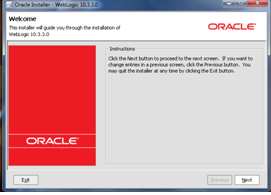
1) Click on the jar file download that brings up the following screen.
                      wls1
2) Click on Next to create a new middleware home by entering the location
                     wls2
3) Click on Next twice and choose the install type as Typical and proceed to JDK selection screen.
                     wls3
4) The generic installer does not ship with any JDK as you see in above screenshot, so install the 64 bit JDK from this link and select this location for local JDK. Click on Next till the final screen of the installation process and you will see the following screen once the installation is completed.
                    wls4
OEPE Installation:
Since generic installer of WLS does not have the OEPE, we have to install the OEPE separately. Download OEPE of Galileo version from this link for 64-bit platform and unzip this in the same location as middleware home  as shown below:
                    oepe1
OSB 11g Installation:
We will see how to install the RCU in next post and will proceed with the installation of OSB 11g. Download OSB 11.1.1.3 from the link, unzip it and click setup.exe in Disk folder that brings up the following screen and enter the 64-bit JDK location.
                    osb1
1) Click on Next that brings up the following screen. Here you can observe that WLS and OEPE are prerequisites for OSB development. Since we already installed these, proceed to next step by clicking on the Next.
                    osb3
2) In the next screen, Select the install type as ‘Typical’ and click on Next twice that brings up the following screen, where we need to specify the Middleware home along with the locations of WLS and OEPE. These locations will be defaulted on choosing the middleware home, otherwise browse the locations manually.
                     osb4
3) Click on Next to review the install summary and click on Install. The following Installation Completed screen will come up once the installation is done successfully.
                     osb5
With this, we are finished with the OSB installation.
The development platform for OSB is Eclipse. To verify the OSB related plug-ins installation, open Eclipse and select Help –> About Eclipse Platform. The last two icons as shown in the below screenshot indicates that OSB related plug-ins are installed and Eclipse is ready for the OSB services development.
                      eclipse1
Notes:
Though OSB is installed successfully, sometimes the OSB related plug-ins will not be visible in Eclipse IDE. To resolve this issue, try reinstalling OSB again and also make sure that the file ‘oracle.osb.ide.link’ has the entry pointing to your OSB installation directory like  path=C:/Oracle/Middleware/Oracle_OSB1 and the file can be found in the location $MW_HOME/<<OEPE Install dir>>/dropins.

Saturday, 24 March 2012

The Transaction Manager based on Oracle BPEL Process Manager - installation

Following are the requirements, assumptions and actions needed to install the Transaction Manager based on Oracle BPEL Process Manager.

Requirements

  1. Oracle BPEL Process Manager,
  2. JDeveloper - used when the business processes are installed,
  3. The Transaction Commiter - there is known URL at which it is/will be available.
  4. The Concurrency Control Module (optionally) - there is known URL at which it is/will be available
List of software that is used, with their Web pages is presented at Hardware and software requirements.

Installation steps

Installation of Transaction Manager based on Oracle BPEL Process Manager:
  1. First, installation file must be downloaded and unzipped.
  2. Then, project located in the file:Example1 directory must be imported to JDeveloper
Example1 project
Example1 project
  1. This project includes BPEL processes which initiate TC and CCM transactions. These processes should not be modified.
  2. The third BPEL process is an example that illustrates how transactional extensions can be used in the BPEL process. On the basis of this process, you can create your own BPEL process which will use the extensions in the imported project.
  3. At the end, it is necessary to modify the settings in the configuration file in the library: Example1/Example/SCA-INF/lib/mzt1.0.jar. This modification is described below, in the Configuration section.

Uninstallation

Uninstallation can be done by removing all components of the project related to the Transaction Manager. This will probably be a significant part of the project, therefore, we propose to delete the entire project and save your own processes, or other important files.

Configuration

Project can function as the Transaction Manager if it is configured correctly. Configuration consists in entering the appropriate addresses in the configuration file. These addresses are used during communication performed by extensions. Configuration file configuration.conf there is in the archive: Example1/Example/SCA-INF/lib/mzt1.0.jar. In this file, an entries that relate addresses of coordinators (TC and CCM) and initiators (which initiate transactions coordinated by TC and CCM), installed in the BProCORE environment should be updated. The addresses of the coordinators should be known after their installation. After the first deployment of the project is possible to verify the addresses of the initiators. These initiators are the business processes MZTInitiator and TFPInitiator.
The sample configuration is as follows:
Assume that MATaddr is address of the Transaction Commiter and MATport is port on which TC is listening, and that MZWDaddr is address of the Concurrency Control Module and MZWDport is port on which CCM is listening.
Then, after a standard installation of these modules, a sample configuration is as follows:
ActivationServiceAddress=http://MATaddr:MATport/axis2/services/\
    MATActivationCoordinator
StandardCoordinationType=http://cs.put.poznan.pl/itsoa/OB2-5/mat/2009/11/
E2PCServiceAddress=http://MATaddr:MATport/axis2/services/\
    MATParticipantEnhanced2PC
MzwdActivationAddress=http://MZWDaddr:MZWDport/axis2/services/\
    ActivationService
CompletionInitiateAddress=http://192.168.96.1:8001/soa-infra/\
    services/default/Example/mztinitiator_client_ep
MzwdTfpInitiatorAddress=http://192.168.96.1:8001/soa-infra/\
    services/default/Example/tfpinitiator_client_ep
Individual parameters in the configuration file have the following meaning:
ActivationServiceAddress
Address of TC activation service.
StandardCoordinationType
The standard type of coordination (not modify this value).
E2PCServiceAddress
Address of the protocol service of Enhanced2PC, used by the participant of transactions. This service is used for nested transactions.
MzwdActivationAddress
Address of CCM activation service.
CompletionInitiateAddress
Address of the protocol service of Enhanced2PC, used by the initiator of TC transactions after deployment on Oracle BPEL Process Manager (MZTInitiator business process),
MzwdTfpInitiatorAddress
Address of the protocol service of TransactionFinallizationProtocol, used by the initiator of CCM transactions after deployment on Oracle BPEL Process Manager (TFPInitiator business process).

xslt padding with characters call template for left pad and right pad

  Could a call-template be written that took two parameters ?   a string, and a   number) return the string with empty spaces appended t...