Sunday, 22 April 2012

Sending Mail from OSB 11g (11.1.1.3.0) to Apache JAMES

In this post I will discuss about sending mails from OSB 11g. I will use Java Apache Mail Enterprise Server (JAMES) as a mail server.

First of all download Apache JAMES 2.3.2 Binary (ZIP Format) from
here. Follow below links for installing it and doing initial configuration –

http://james.apache.org/server/head/installation_instructions.html
http://wiki.apache.org/james/JamesQuickstart

I configured a mail server anuj.com and created two users oracle@anuj.com and testuser@anuj.com

Now I will configure Oracle Service Bus. First of all create a SMTP Server resource in OSB configuration. For creating a SMTP server resource go to System Administration --> Global Resources --> SMTP Servers and click on “add” (You have to click on “Create” button in the change center to create a new session for your editing, otherwise “add” button will remain disabled)
Provide the details there as shown below-


After creating SMTP server, I will create one Email business service to send messages to JAMES. You may create a business service inside any OSB project.

I am creating a business service named “TestLocalMailServer” which is a “Messaging Service” type business service –


Click on next and it will ask you to provide message type configuration details(request and response message type) –


I select request message type as “Text” and Response message type as “None” (because no response is expected in email transport as it is a one way process)

Click on next and provide the transport configuration details. Select “email” in transport dropdown list and add an endpoint URI oracle@anuj.com –


Click on next and provide the Email transport configuration. In “SMTP Server” dropdown list, select the SMTP server you created earlier. Provide the “from” and “reply to” details as well –


Now click on “Last” (to choose default for rest of the settings) and you will see below configuration –


Save the business service details and activate the configuration using Change center.

You are done with the configuration part now and your business service is ready to be tested.

Open the OSB test console by clicking on the “bug” icon against the business service name. Provide the message/text you want to mail across and set the subject line-


Now click on “Execute” and if processing goes successful then you would see “There was no response.” text under “Response Document” section –


Now to check whether actually mail has been received on JAMES, go to james-2.3.2\apps\james\var\mail\inboxes\oracle directory and should see two files there (for one message) –


Open the file with extension “FileStreamStore” in any text editor and it will show you content below content –


So you are done with sending mails from Oracle Service Bus to Apache JAMES

Tuesday, 10 April 2012

Oracle Service Bus 11g (OSB) Installation

Back again, after a long long long time!!! Lot of things happened over this period and i got into completely different technology i.e. Oracle Fusion Middleware. Currently working on Oracle Service Bus(OSB) and BPEL, so thought of sharing whatever i had learnt and learning.
This post talks about the OSB 11g installation that i tried in my Windows 7 machine. Oracle has got this product into their kitty after BEA acquisition, which was known as Aqua Logic Service Bus (ALSB) earlier. After the acquisition of BEA, Oracle had rebranded ALSB as Oracle Service Bus (OSB). OSB 10.3 is the initial and official release (in 2008) by Oracle. The next version of OSB 11g (11.1.1.3) is released in the last year and the latest release of OSB is 11.1.1.4 released before 2 or 3 weeks.
The following are the prerequisites for OSB11g installation:
  • WebLogic Server 10.3.3
  • 64-bit JDK – If we are using generic installer for WLS
  • Oracle Enterprise Pack for Eclipse (OEPE)
  • Repository Creation Utility (RCU) – If we want to create domain with OWSM extension
WebLogic Server (WLS) Installation:
The WLS 10.3.3 can be downloaded from this link. In this link, we can see the installers for 32-bit JVM for both windows and Linux and also a generic installer. If you are using 32-bit machines download and install the exe “Oracle WebLogic Server 11gR1 (10.3.3) + Coherence + OEPE – Package Installer”, that contains WLS and OEPE. For 64-bit machines download the generic installer.
We will go through the installation with the use of some screenshots:
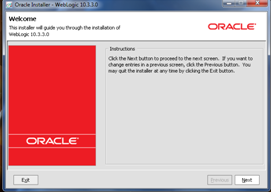
1) Click on the jar file download that brings up the following screen.
                      wls1
2) Click on Next to create a new middleware home by entering the location
                     wls2
3) Click on Next twice and choose the install type as Typical and proceed to JDK selection screen.
                     wls3
4) The generic installer does not ship with any JDK as you see in above screenshot, so install the 64 bit JDK from this link and select this location for local JDK. Click on Next till the final screen of the installation process and you will see the following screen once the installation is completed.
                    wls4
OEPE Installation:
Since generic installer of WLS does not have the OEPE, we have to install the OEPE separately. Download OEPE of Galileo version from this link for 64-bit platform and unzip this in the same location as middleware home  as shown below:
                    oepe1
OSB 11g Installation:
We will see how to install the RCU in next post and will proceed with the installation of OSB 11g. Download OSB 11.1.1.3 from the link, unzip it and click setup.exe in Disk folder that brings up the following screen and enter the 64-bit JDK location.
                    osb1
1) Click on Next that brings up the following screen. Here you can observe that WLS and OEPE are prerequisites for OSB development. Since we already installed these, proceed to next step by clicking on the Next.
                    osb3
2) In the next screen, Select the install type as ‘Typical’ and click on Next twice that brings up the following screen, where we need to specify the Middleware home along with the locations of WLS and OEPE. These locations will be defaulted on choosing the middleware home, otherwise browse the locations manually.
                     osb4
3) Click on Next to review the install summary and click on Install. The following Installation Completed screen will come up once the installation is done successfully.
                     osb5
With this, we are finished with the OSB installation.
The development platform for OSB is Eclipse. To verify the OSB related plug-ins installation, open Eclipse and select Help –> About Eclipse Platform. The last two icons as shown in the below screenshot indicates that OSB related plug-ins are installed and Eclipse is ready for the OSB services development.
                      eclipse1
Notes:
Though OSB is installed successfully, sometimes the OSB related plug-ins will not be visible in Eclipse IDE. To resolve this issue, try reinstalling OSB again and also make sure that the file ‘oracle.osb.ide.link’ has the entry pointing to your OSB installation directory like  path=C:/Oracle/Middleware/Oracle_OSB1 and the file can be found in the location $MW_HOME/<<OEPE Install dir>>/dropins.

Saturday, 24 March 2012

The Transaction Manager based on Oracle BPEL Process Manager - installation

Following are the requirements, assumptions and actions needed to install the Transaction Manager based on Oracle BPEL Process Manager.

Requirements

  1. Oracle BPEL Process Manager,
  2. JDeveloper - used when the business processes are installed,
  3. The Transaction Commiter - there is known URL at which it is/will be available.
  4. The Concurrency Control Module (optionally) - there is known URL at which it is/will be available
List of software that is used, with their Web pages is presented at Hardware and software requirements.

Installation steps

Installation of Transaction Manager based on Oracle BPEL Process Manager:
  1. First, installation file must be downloaded and unzipped.
  2. Then, project located in the file:Example1 directory must be imported to JDeveloper
Example1 project
Example1 project
  1. This project includes BPEL processes which initiate TC and CCM transactions. These processes should not be modified.
  2. The third BPEL process is an example that illustrates how transactional extensions can be used in the BPEL process. On the basis of this process, you can create your own BPEL process which will use the extensions in the imported project.
  3. At the end, it is necessary to modify the settings in the configuration file in the library: Example1/Example/SCA-INF/lib/mzt1.0.jar. This modification is described below, in the Configuration section.

Uninstallation

Uninstallation can be done by removing all components of the project related to the Transaction Manager. This will probably be a significant part of the project, therefore, we propose to delete the entire project and save your own processes, or other important files.

Configuration

Project can function as the Transaction Manager if it is configured correctly. Configuration consists in entering the appropriate addresses in the configuration file. These addresses are used during communication performed by extensions. Configuration file configuration.conf there is in the archive: Example1/Example/SCA-INF/lib/mzt1.0.jar. In this file, an entries that relate addresses of coordinators (TC and CCM) and initiators (which initiate transactions coordinated by TC and CCM), installed in the BProCORE environment should be updated. The addresses of the coordinators should be known after their installation. After the first deployment of the project is possible to verify the addresses of the initiators. These initiators are the business processes MZTInitiator and TFPInitiator.
The sample configuration is as follows:
Assume that MATaddr is address of the Transaction Commiter and MATport is port on which TC is listening, and that MZWDaddr is address of the Concurrency Control Module and MZWDport is port on which CCM is listening.
Then, after a standard installation of these modules, a sample configuration is as follows:
ActivationServiceAddress=http://MATaddr:MATport/axis2/services/\
    MATActivationCoordinator
StandardCoordinationType=http://cs.put.poznan.pl/itsoa/OB2-5/mat/2009/11/
E2PCServiceAddress=http://MATaddr:MATport/axis2/services/\
    MATParticipantEnhanced2PC
MzwdActivationAddress=http://MZWDaddr:MZWDport/axis2/services/\
    ActivationService
CompletionInitiateAddress=http://192.168.96.1:8001/soa-infra/\
    services/default/Example/mztinitiator_client_ep
MzwdTfpInitiatorAddress=http://192.168.96.1:8001/soa-infra/\
    services/default/Example/tfpinitiator_client_ep
Individual parameters in the configuration file have the following meaning:
ActivationServiceAddress
Address of TC activation service.
StandardCoordinationType
The standard type of coordination (not modify this value).
E2PCServiceAddress
Address of the protocol service of Enhanced2PC, used by the participant of transactions. This service is used for nested transactions.
MzwdActivationAddress
Address of CCM activation service.
CompletionInitiateAddress
Address of the protocol service of Enhanced2PC, used by the initiator of TC transactions after deployment on Oracle BPEL Process Manager (MZTInitiator business process),
MzwdTfpInitiatorAddress
Address of the protocol service of TransactionFinallizationProtocol, used by the initiator of CCM transactions after deployment on Oracle BPEL Process Manager (TFPInitiator business process).

Configure Transaction Timeout for BPEL on SOA 11g

Applies to:

Oracle SOA Platform - Version: 11.1.1.1.0 to 11.1.1.5.0 - 

Goal

During runtime you may be seeing errors in the log similar to the following:


The transaction was rolled back
or
Transaction Rolledback.: weblogic.transaction.internal.TimedOutException: Transaction timed out

The solution is typically to increase the transaction timeout for the process.  

Solution

As a general rule, you should keep the following relation between the timeout parameters:

syncMaxWaitTime < BPEL EJB's transaction timeout < Global Transaction Timeout
Note: This recommendation are ONLY applicable to Sync Processes. Additionally the default Timeout setting that comes with SOA 11g installation does not comply with this rule. You might need to adjust the setting according to your particular business needs.


1. Setting syncMaxWaitTime:

This property controls the maximum time the process result receiver will wait for a result before returning for Sync processes.

For SOA 11g R1 PS1 (11.1.1.1.0 to 11.1.1.5):
* Login into EM
* Expand SOA and right click on "soa-infra" and select: SOA Administration -> BPEL Properties
* Click on "More BPEL Configuration Properties..." link
* Locate syncMaxWaitTime and change it.


-- Alternative Method -- For SOA 11g R1 (11.1.1.1.0) ONLY:
* Take backup of bpel-config.xml, located at: /user_projects/domains//config/soa-infra/configuration/.
* Open the bpel-config.xml file.
* Edit the value for the syncMaxWaitTime property.
* Save the changes.
* Restart Oracle WebLogic Server.

Note: Since 11.1.1.2, bpel-config.xml is no longer available into the file system and therefore the only chance for modification is through EM Console.


2. Setting the transaction timeout for BPEL EJBs:

The timeout properties for the EJBs control the particular timeout setting for the SOA application, overriding the global setting specified by the JTA timeout (See step 3).


Note: Prior implement next steps, ensure to shutdown SOA managed server. Otherwise you will get errors, see following document for details Note 1271369.1


* Log into Oracle WebLogic Administration Console.
* Click Deployments.
* Expand soa-infra -> EJBs.
* Following EJBs need to be updated:
BPELActivityManagerBean
BPELDeliveryBean
BPELDispatcherBean
BPELEngineBean
BPELFinderBean
BPELInstanceManagerBean
BPELProcessManagerBean
BPELSensorValuesBean
BPELServerManagerBean
* You can change the parameter in the Configuration tab for the Transaction Timeout setting.
* Click Save.
* Save the Plan.xml to some known location
* Start SOA Managed Server


3. Setting the global transaction timeout at Weblogic Domain Level:

This property controls the transaction timeout seconds for active transactions. If the transaction is still in the "active" state after this time, it is automatically rolled back.

   * Log into Oracle WebLogic Administration Console.
   * Click Services -> JTA.
   * Change the value of Timeout Seconds (the default is 30).
   * Click Save.
   * Restart Oracle WebLogic Server.

Thursday, 22 March 2012

Application Integration Architecture

AIA has pre-built common object definitions and services. Oracle AIA is built on Oracle Fusion Middleware's market leading SOA and BPM products.
AIA provides a foundation on which to build business-process flows. AIA delivers Pre-built Integrations as either Direct Integrations (DIs) or Process Integration Packs (PIPs).
  • Direct Integrations (DIs): Pre-built integrations that manage data flows and data synchronizations between Applications.
  • Process Integration Packs (PIPs): Help optimize processes; they are pre-built composite business processes across enterprise Applications. They allow companies to get up and running with core processes quickly. AIA and PIPs decrease software development time. PIPs operate both horizontally and vertically. Vertical PIPs cater to industries like telecoms, retail, and banking/insurance.
Oracle AIA for Communications provide end-to-end, integrated business processes, applications, and technology for the Telecom industry. Oracle AIA for Communications provide three PIPs -
Order to Bill PIP - provides pre-built integration between Oracle Siebel CRM with Oracle BRM allowing for synchronization of customer, product and pricing data across these applications. Customer Service Reps (CSRs) can create accounts and submit Sales Orders which would syncchronize automatically between the CRM and Billing systems in the Business support systemBSS eco-system.
Order to Activate PIP - provide support for Lead to Cash and Concept to Market eTOM business processes by expediting the introduction of new product offerings, capturing and fulfilling orders efficiently and accurately, managing fallouts, and providing visibility across the entire order lifecycle. This is a part of the RODOD framework and typically spans across the following Oracle products - Siebel, BRM, AIA, OSM COM and OSM SOM. This PIP journeys the BSS as well as the OSS components.
Agent Assisted Billing Care PIP - provides pre-built integration for integration between Oracle Siebel CRM with Oracle BRM including usage and billing data maintained within Oracle BRM. This empowers CSRs to resolve billing queries faster, improving customer satisfaction.

Wednesday, 14 March 2012

FAULT POLICY IN SOA 11G


Fault Policy Overview


* Since 10.1.3.3
* Catches all faults from an invoke activity (both run time and business faults)
* Important: overrides all catch activities in BPEL process.
* A fault policy defines conditions and their corresponding fault recovery actions.
* Fault policies are defined in multiple files under directory:
- bpel\domains\default\config\fault-policies
* XSD files are:
- bpel\system\xmllib\fault-policy.xsd
- bpel\system\xmllib\fault-policy-binding.xsd
* A fault policy can be associated at the following levels:
- Partner link
- Port type
- Process level via bpel.xml
- Domain level via fault-bindings.xml
* Fault policy binding order:
-> bpel.xml: partner link -> port type -> process
-> domain: partner link -> port type -> process
-> Catch blocks defined in bpel diagram.

SOA Fault Types

Business Faults

* Programmer defined.
* Defined in WSDL.

Runtime Faults

* Predefined, e.g.
- remoteFault
- bindingFault
* Infrastructure faults, e.g.
- Service down
- Network outage
* Data format errors

Design a Fault Policy

Create a Fault Policy File

* Create policy file (e.g. my-policies.xml) in bpel\domains\domain_name\config\fault-policies directory

Define conditions

* Conditions are based on faultName. e.g.
 
<faultName
  xmlns:bpelx="http://schemas.oracle.com/bpel/extension"
  name="bpelx:remoteFault">
 
* Multiple conditions are allowed for a single faultName
- if so, conditions are evaluated sequentially
 
  <condition>
    <test>$fault.code/code="WSDLReadingError"</test>
    <action ref="ora-terminate"/>
  </condition>
  <condition>
    <action ref="ora-java"/>
  </condition>
 
* Each condition has
- one test section which is an XPath expression against fault variable
 
    <test>$fault.code/code="WSDLReadingError"</test>
 
- one action section which references to the action defined in the same file
 
    <action ref="ora-terminate"/>
 
- No test condition catches all
 
<condition>
  <action ref="ora-rethrow"/>
</condition>
 
- No faultName catches all faults
 
<faultName > . . . </faultName>
 

Define actions

* See examples below.

Fault Policy Examples

* Conditions
 
<Conditions>
  <!-- when bpelx:remoteFault, retry -->
  <faultName
    xmlns:bpelx="http://schemas.oracle.com/bpel/extension"
    name="bpelx:remoteFault">
    <condition>
      <action ref="ora-retry"/>
    </condition>
  </faultName>
 
  <!-- when bpelx:bindingFault, rethrow fault -->
  <faultName
    xmlns:bpelx="http://schemas.oracle.com/bpel/extension"
    name="bpelx:bindingFault">
    <condition>
      <action ref="ora-rethrow-fault"/>
    </condition>
  </faultName>
</Conditions>
 
* Actions
 
<!-- retry Action -->
<Action id="ora-retry">
  <retry>
    <retryCount>8</retryCount>
    <retryInterval>2</retryInterval>
    <retryFailureAction ref="ora-terminate"/>
    <exponentialBackoff/>
  </retry>
</Action>
 
<!-- replayScope Action -->
<Action id="ora-replay-scope">
  <replayScope/>
</Action>
 
<!-- rethrowFault Action -->
<Action id="ora-rethrow-fault">
  <rethrowFault/>
</Action>
 
<!-- humanIntervention Action -->
<Action id="ora-human-intervention">
  <humanIntervention/>
</Action>
 
<!-- abort Action -->
<Action id="ora-terminate">
  <abort/>
</Action>
 
<!-- Custom Java Action -->
<Action id="ora-java">
  <javaAction className="mypackage.myClass"
    defaultAction="ora-terminate"
    propertySet="propSet1">
    <returnValue value="R_TRM"
      ref="ora-terminate"/>
    <returnValue value="R_THRW"
      ref="ora-rethrow-fault"/>
  </javaAction>
</Action>
- Java class must implement IFaultRecoveryJavaClass interface
 
public interface IFaultRecoveryJavaClass {
  public void handleRetrySuccess(IFaultRecoveryContext ctx );
  public String handleBPELFault(IFaultRecoveryContext ctx );
}

Associate a Fault Policy

* Process level
- Configured in bpel.xml file.
- Only one fault policy can be bound to a process, port type, or partner link.
- Multiple port types or partner links can be bound to a single fault policy.
 
<faultPolicyBindings>
  <!-- Fault on any plink/port type not specified -->
  <!-- below uses policy BillingFaults -->
<process faultPolicy="BillingFaults"/>
<partnerLink xmlns:credit="http://services.otn.com" faultPolicy="CRM_
    ServiceFaults">
      <!-- Fault on these 2 plink will use policy CRM_ServiceFaults -->
      <name>UnitedLoanService</name>
      <name>StarLoanService</name>
 
    <!----Fault on these 2 port types uses policy CRM_ServiceFaults -->
<portType>credit:CreditRatingService</portType>
<portType xmlns:united="http://services.uninted.com/loan">
    united:UnitedLoanService</portType>
  </partnerLink>
<partnerLink faultPolicy="myOtherFaults">
    <!-- Fault on this plink uses policy myOtherFaults -->
    <name>AnotherPartnerLink</name>
  </partnerLink>
</faultPolicyBindings>
 
* Domain level
- Configured in OracleAS_2\bpel\domains\default\config\fault-bindings.xml file.
 
  <!-- all processes in this domain use DefaultPolicy -->
<process faultPolicy="DefaultPolicy"/>
 
 
<partnerLink faultPolicy="DefaultPolicy">
    <!-- all invoke faults at partner link creditRatingService use DefaultPolicy -->
    <name>creditRatingService</name>
  </partnerLink>
 
 
<partnerLink faultPolicy="DefaultPolicy">
    <!-- all invoke faults at specific port type use DefaultPolicy -->
<portType
      xmlns:db="http://xmlns.oracle.com/pcbpel/adapter/db/insert/">db:insert_plt</portType>
  </partnerLink>
 

Human Intervention in Oracle BPEL Control

* Login BPEL console
* Click Activities tab
* Seach activities based on states
- All States: Displays all activities, regardless of their state.
- Open: Displays only open activities.
- Completed: Displays only completed activities.
- Cancelled: Displays only cancelled activities.
- Stale: Displays only stale activities.
- Pending: Displays only pending activities.
* Click the faulted activity
* Optionally change the variable values
* Select action to take
- Retry: Retries the activity with an option to provide a retry success action.
- Abort: Terminates the process instance of the faulted activity.
- Rethrow: Rethrows the exception and allows the BPEL fault handlers (catch branches) to handle the fault.
- Replay: Replays the scope in which the fault occurred.
- Continue: Skips the activity. The framework assumes the activity completed with no fault.
* Click the Recover button.

SOA11g Adapter definitions

  1. Describe adapter concepts and framework
    1. Overview
    2. Adapter Types
    3. Service Types
    4. Technology Adapters
    5. Legacy Adapters
        1. Oracle Connect
        2. Oracle Studio
    6. Packaged-Application Adapters
    7. Oracle Adapter for Oracle Applications
  2. Describe Technology adapters: File, Database, JMS, etc
    1. File/FTP Adapter
    2. Socket Adapter
    3. JMS Adapter
    4. Database Adapter
    5. AQ Adapter
    6. MQ Adapter
    7. BAM Adapter
  3. Describe Applications Adapters Ebiz suite,Peoplesoft, Siebel, etc
  4. Explain adapter run-time configuration
  5. Explain adapter design-time configuration
  6. References
This is part of 1Z0-451: Oracle SOA Foundation Practitioner Exam

Describe adapter concepts and framework

Overview

* Oracle Adapters use JCA technology to connect external systems to the Oracle SOA Suite.
* Based on open standards such as JCA, XML, WSDL.
* Assembled with SCA model.

Adapter Types

* Technology adapters
- Installed as part of Oracle Fusion Middleware.
* Legacy adapters
* Packaged-application adapters
* Oracle application adapters

Service Types

Request-Response (Outbound Interaction) Service
* Support synchronous request-response service.
* Used to:
- CRUD back-end data
- call back-end workflows and transactions

Event Notification (Inbound Interaction) Service
* Support asynchronous event-notification service.
* Listen or poll for back-end event changes.
* Used to keep track of back-end events.

Metadata Service

Technology Adapters

* Files
* FTP
* Sockets
* Database Adapter
* Java Messaging Service (JMS)
* BAM
* Advanced Queuing (AQ)
* Message Queuing (MQ) Series
* See here for details.

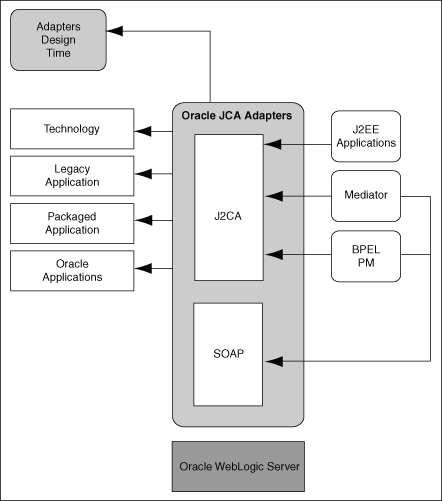
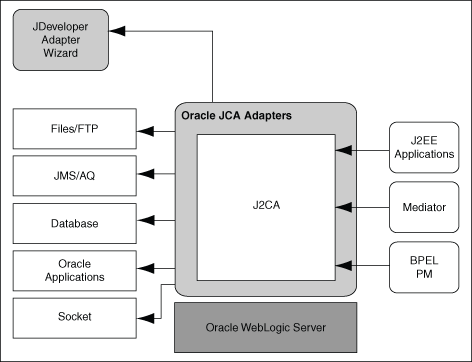
Architecture


Design-Time Components
* Use JDev to generate adapter metadata.
- Binding config files consist of J2CA-centric XML markup.
- Binding config files used by JCA Binding Component to seamlessly integrate the JCA 1.5 resource adapter with Oracle Fusion Middleware.


Run-Time Components
* Adapter run-time component is the JCA 1.5 resource adapter for the specific back-end application.
* Deployed in JCA container of the WebLogic Server.
* Integration with OFM is achieved through the JCA Binding Component, which converts Web service messages to JCA interactions and back. See here for more details.

Deployment
* Technology adapters are deployed as JCA 1.5 resource adapters within the same WebLogic Server container as that of OFM.
* JNDI names are used at design time with JDev. Need to setup JNDI at deployment.

Legacy Adapters

* Tuxedo
* CICS
* VSAM
* IMS/TM
* IMS/DB

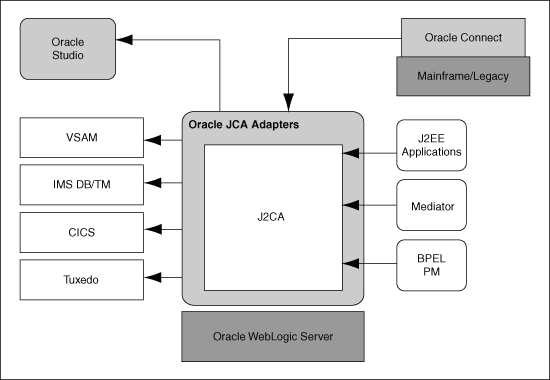
Architecture
Oracle Connect
* Oracle Connect is a component that resides on the legacy and mainframe platforms.
* It consists of native adapters for communicating with the mainframe application and data stores.
* It consists of:
- Server processes: process client requests.
- Native adapters: to communicate with Tuxedo and IMS-TM txn systems.
- Daemon: RPC-based listener that manages and maintains multiple server configurations.
- Repository: one repository per Oracle Connect instance to store XML-based schema and config info.

Oracle Studio
* Oracle Studio is a design time tool for configuring the Oracle AS Adapters for mainframes.
* Enables you to configure the services, events, and connection information for native adapters.
* Enables you to do management and monitoring of Oracle Connect.
* Based on Eclipse and available on Windows platform only.

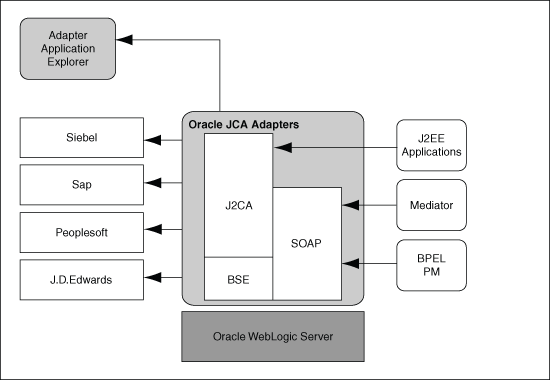
Packaged-Application Adapters

* Available as part of the OracleAS Adapters CD.

Packaged-Application Adapters
* SAP R/3
* PeopleSoft
* Siebel
* J.D. Edwards OneWorld

Architecture

Oracle Adapter for Oracle Applications

* a.k.a E-Business Suite Adapter

Describe Technology adapters: File, Database, JMS, etc

* See here for a list of adapter related books.
* Provides comprehensive, bidirectional, multimodal, synchronous, and asynchronous connectivity to Oracle Applications.

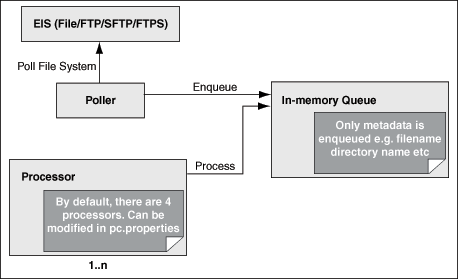
File/FTP Adapter

Supported operations
* Read File
* Write File
* Synchronous Read File
* List Files

Features
* File formats
- XML
- Delimited
- Fixed positional
- Binary
- COBOL Copybook data
- opaque (e.g. JPEGs)
* FTP Servers
- Supports most RFC 959 compliant FTP servers on all platforms.
- Supports SFTP server version 4 or later.
* Inbound and outbound interactions
* File debatching: publish messages in a specific number of batches.
* File ChunkedRead: uses an invoke activity within a while loop to process the target file (usually large file).
* File Sorting
- Use a synchronous operation
- Add the following property to the inbound JCA file:
 
<property name="ListSorter" value="oracle.tip.adapter.file.inbound.listing.TimestampSorterAscending"/>
<property name="SingleThreadModel" value="true"/>
 
* Dynamic outbound directory and file name specification.
* Security
* Nontransactional
* Proxy support:
- make sure proxy server supports FTP traffic through HTTP connection.
- only passive data connections are supported.
* No payload support
- select Do not read file content option.
* Large payload support
- select Read File as Attachment option.
* File based triggers
* pre-processing and post-processing of files
- Use pipeline and valves
* Error handling
* Threading Model
- default threading model:

- modified threading model: single threaded model, partitioned threaded model.
* Performance tuning
- use knobs to throttle the inbound and outbound operations.
- see here for more details.
* High availability
* Multiple directories
- Process files recursively
- Use ignoreListingErrors property to ignore folder permission issues.
* Append mode
- Not supported for SFTP scenarios
* Securing Enterprise Information System Credentials
- Use WebLogic Admin Console to config.

Socket Adapter

* Used by Mediator and BPEL to read and write data over TCP/IP sockets.
* Oracle Socket Adapter is a JCA 1.5 compliant adapter for modeling standard or nonstandard protocols for communication over TCP/IP sockets.
* You can use an Oracle Socket Adapter to create a client or a server socket, and establish a connection.
* The data that is transported can be text or binary.
* Communication modes:
- Inbound synchronous request/response
- Outbound sync request/response
- Inbound receive
- Outbound invoke

JMS Adapter

* Is based on JMS version 1.0.2b
* Is a generic Oracle JMS Adapter (works with any JMS provider).
* Supports JMS topics and queues.
* Supports byte, text, and map message types.
* Supports JMS headers and properties.
* Supports jca.message.encoding property.
* Supports the JMS message selector.
* Is DOM2 compliant.
* Supports normalized message.
* Supports specifying a durable JMS subscriber.
* Supports persistent and nonpersistent modes of a JMS publisher.
* Support three JMS types of acknowledgments:
- DUPS_OK_ACKNOWLEDGE
- AUTO_ACKNOWLEDGE
- CLIENT_ACKNOWLEDGE
* Supports tracking message size.
* Supports MapMessage Data Type.
* Supports Enterprise Information System (EIS) Credentials.
* Supports Streaming Large Payload.
* Supports Transactions.
* Supports Error Handling.
* Supports Multiple Consumer Threads.
* Supports Performance Tuning
* Does not support connection retry functionality for MQ provider.
* Does not support outbound retry functionality for AQJMS on Solaris.

Database Adapter

* Enables Oracle SOA Suite and Oracle Fusion Middleware to communicate with database end points.
* Is a JCA 1.5 connector, which runs on the Oracle Application Server.
* Relies on an underlying JDBC connector/driver to enact the database communication.
* Non-programmatic (unlike JDBC).

AQ Adapter

* The Oracle AQ Adapter is both a producer and a consumer of AQ messages.
* The enqueue operation is exposed as a JCA outbound interaction.
* The dequeue operation is exposed as a JCA inbound interaction.
* The Oracle AQ Adapter supports ADT (Oracle object type), XMLType, and RAW queues as payloads. It also supports extracting a payload from one ADT member column.

AQ Adapter Features
* Enqueue-Specific Features (Message Production):
- Correlation Identifier which can be used to retrieve specific messages.
- Multi-consumer Queue.
- Message priority.
- Time specification and scheduling (delay interval and expiration time).
* Dequeue and Enqueue Features:
- Poll option.
- Notification option.
- Mutliconsumer queue.
- Navigation of messages for dequeuing (use correlation id as dequeue order).
- Retries with delays (message is moved to exception queue if retries failed).
- Rule based suscription.
- Oracle AQ Adapter header properties.
- Dequeue condition.

MQ Adapter

* The Oracle MQ Series Adapter enables applications to
- connect to MQ Series queue managers
- place MQ Series messages on queues
- or remove MQ Series messages from queues.
* The Oracle MQ Series Adapter provides all native MQ Series functionalities:
- Supports Positive Action Notification (PAN) and Negative Action Notification (NAN).
- Supports report messages such as confirmation on delivery, confirmation on arrival, exception report, and expiry report.
- Supports sending unwanted or corrupted messages to a dead-letter queue.
- Provides advanced filter options, such as filtering message belonging to a group.
- Faster and easier to use than Oracle JMS Adapter.

xslt padding with characters call template for left pad and right pad

  Could a call-template be written that took two parameters ?   a string, and a   number) return the string with empty spaces appended t...